CONFIDENTIAL
OLED TV
SERVICE MANUAL
CHASSIS : EA91E
MODEL : OLED55/65C9PUA
MODEL : OLED55/65C9AUA
CAUTION
BEFORE SERVICING THE CHASSIS, READ THE SAFETY PRECAUTIONS IN THIS MANUAL.
P/NO : MFL71409501 (1903-REV01)
Any reproduction, duplication, distribution (including by way of email, facsimile or other electronic means),
publication, modification, copying or transmission of this Service Manual is STRICTLY PROHIBITED unless you
have obtained the prior written consent of the LG Electronics entity from which you received this Service Manual.
The material covered by this prohibition includes, without limitation, any text, graphics or logos in this Service
Manual.
Copyright © 2019 LG Electronics Inc. All rights reserved. Only training and service purposes.
CONTENTS
CONTENTS ............................................................................................... 2
SAFETY PRECAUTIONS ......................................................................... 3
SERVICING PRECAUTIONS .................................................................... 4
SPECIFICATION ........................................................................................ 6
SOFTWARE UPDATE ............................................................................... 9
BLOCK DIAGRAM .................................................................................. 10
EXPLODED VIEW ................................................................................... 16
DISASSEMBLY GUIDE .......................................................................... 17
TROUBLE SHOOTING GUIDE ................................................. APPENDIX
-2- Copyright © LG Electronics Inc. All rights reserved.
Only for training and service purposes.
SAFETY PRECAUTIONS
IMPORTANT SAFETY NOTICE
Many electrical and mechanical parts in this chassis have special safety-related characteristics. These parts are identified by in the
Exploded View.
It is essential that these special safety parts should be replaced with the same components as recommended in this manual to prevent
Shock, Fire, or other Hazards.
Do not modify the original design without permission of manufacturer.
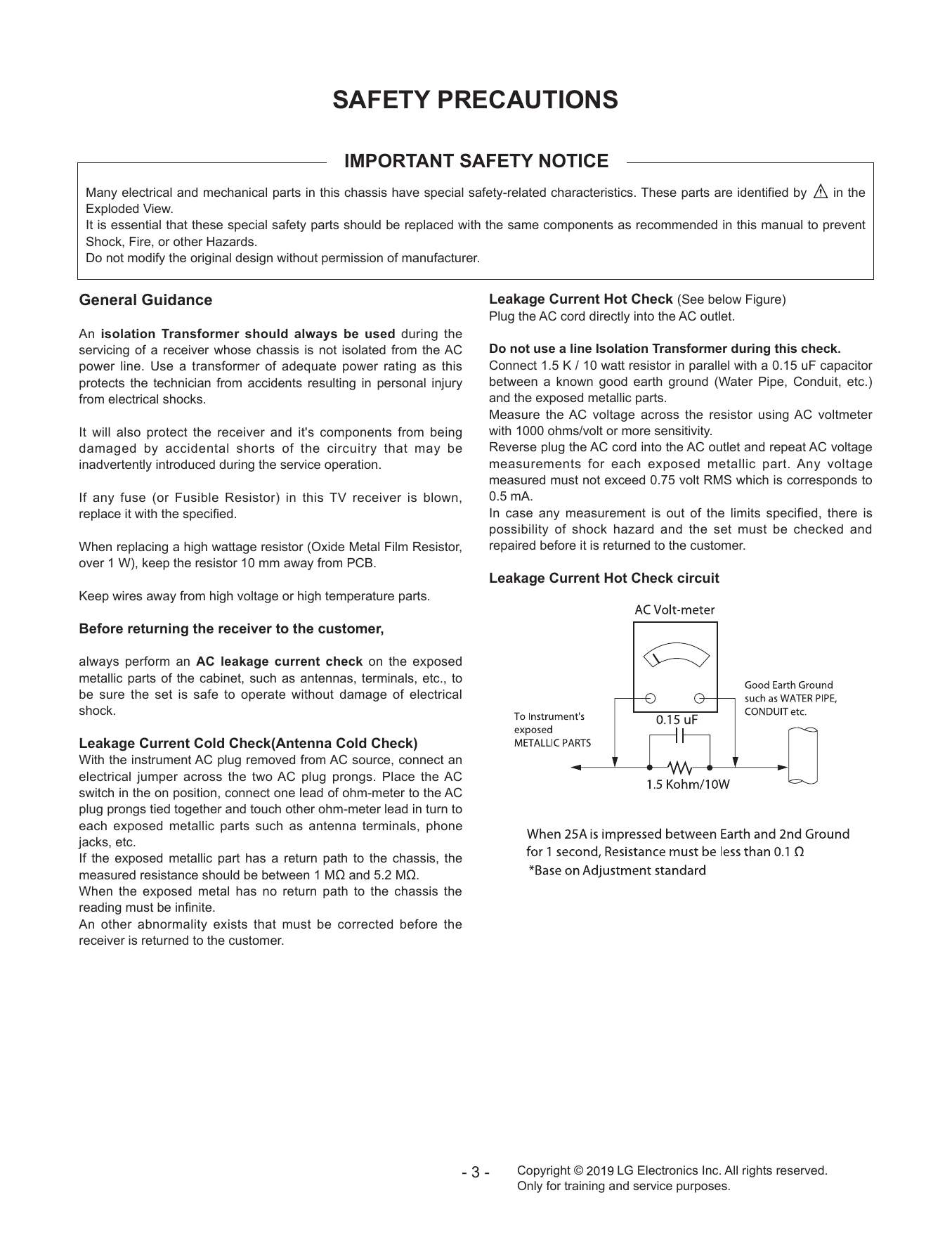
General Guidance Leakage Current Hot Check (See below Figure)
Plug the AC cord directly into the AC outlet.
An isolation Transformer should always be used during the
servicing of a receiver whose chassis is not isolated from the AC Do not use a line Isolation Transformer during this check.
power line. Use a transformer of adequate power rating as this Connect 1.5 K / 10 watt resistor in parallel with a 0.15 uF capacitor
protects the technician from accidents resulting in personal injury between a known good earth ground (Water Pipe, Conduit, etc.)
from electrical shocks. and the exposed metallic parts.
Measure the AC voltage across the resistor using AC voltmeter
It will also protect the receiver and it's components from being with 1000 ohms/volt or more sensitivity.
damaged by accidental shorts of the circuitry that may be Reverse plug the AC cord into the AC outlet and repeat AC voltage
inadvertently introduced during the service operation. measurements for each exposed metallic part. Any voltage
measured must not exceed 0.75 volt RMS which is corresponds to
If any fuse (or Fusible Resistor) in this TV receiver is blown, 0.5 mA.
replace it with the specified. In case any measurement is out of the limits specified, there is
possibility of shock hazard and the set must be checked and
When replacing a high wattage resistor (Oxide Metal Film Resistor, repaired before it is returned to the customer.
over 1 W), keep the resistor 10 mm away from PCB.
Leakage Current Hot Check circuit
Keep wires away from high voltage or high temperature parts.
Before returning the receiver to the customer,
always perform an AC leakage current check on the exposed
metallic parts of the cabinet, such as antennas, terminals, etc., to
be sure the set is safe to operate without damage of electrical
shock.
Leakage Current Cold Check(Antenna Cold Check)
With the instrument AC plug removed from AC source, connect an
electrical jumper across the two AC plug prongs. Place the AC
switch in the on position, connect one lead of ohm-meter to the AC
plug prongs tied together and touch other ohm-meter lead in turn to
each exposed metallic parts such as antenna terminals, phone
jacks, etc.
If the exposed metallic part has a return path to the chassis, the
measured resistance should be between 1 MΩ and 5.2 MΩ.
When the exposed metal has no return path to the chassis the
reading must be infinite.
An other abnormality exists that must be corrected before the
receiver is returned to the customer.
-3- Copyright © LG Electronics Inc. All rights reserved.
Only for training and service purposes.
SERVICING PRECAUTIONS
CAUTION: Before servicing receivers covered by this service 2. After removing an electrical assembly equipped with ES
manual and its supplements and addenda, read and follow the devices, place the assembly on a conductive surface such as
SAFETY PRECAUTIONS on page 3 of this publication. aluminum foil, to prevent electrostatic charge buildup or expo-
NOTE: If unforeseen circumstances create conflict between the sure of the assembly.
following servicing precautions and any of the safety precautions 3. Use only a grounded-tip soldering iron to solder or unsolder ES
on page 3 of this publication, always follow the safety precautions. devices.
Remember: Safety First. 4. Use only an anti-static type solder removal device. Some solder
removal devices not classified as “anti-static” can generate
General Servicing Precautions electrical charges sufficient to damage ES devices.
1. Always unplug the receiver AC power cord from the AC power 5. Do not use freon-propelled chemicals. These can generate
source before; electrical charges sufficient to damage ES devices.
a. Removing or reinstalling any component, circuit board mod- 6. Do not remove a replacement ES device from its protective
ule or any other receiver assembly. package until immediately before you are ready to install it.
b. Disconnecting or reconnecting any receiver electrical plug or (Most replacement ES devices are packaged with leads electri-
other electrical connection. cally shorted together by conductive foam, aluminum foil or
c. Connecting a test substitute in parallel with an electrolytic comparable conductive material).
capacitor in the receiver. 7. Immediately before removing the protective material from the
CAUTION: A wrong part substitution or incorrect polarity leads of a replacement ES device, touch the protective material
installation of electrolytic capacitors may result in an explo- to the chassis or circuit assembly into which the device will be
sion hazard. installed.
2. Test high voltage only by measuring it with an appropriate CAUTION: Be sure no power is applied to the chassis or circuit,
high voltage meter or other voltage measuring device (DVM, and observe all other safety precautions.
FETVOM, etc) equipped with a suitable high voltage probe. 8. Minimize bodily motions when handling unpackaged replace-
Do not test high voltage by "drawing an arc". ment ES devices. (Otherwise harmless motion such as the
3. Do not spray chemicals on or near this receiver or any of its brushing together of your clothes fabric or the lifting of your
assemblies. foot from a carpeted floor can generate static electricity suf-
4. Unless specified otherwise in this service manual, clean ficient to damage an ES device.)
electrical contacts only by applying the following mixture to the
contacts with a pipe cleaner, cotton-tipped stick or comparable General Soldering Guidelines
non-abrasive applicator; 10 % (by volume) Acetone and 90 % 1. Use a grounded-tip, low-wattage soldering iron and appropriate
(by volume) isopropyl alcohol (90 % - 99 % strength) tip size and shape that will maintain tip temperature within the
CAUTION: This is a flammable mixture. range or 500 °F to 600 °F.
Unless specified otherwise in this service manual, lubrication of 2. Use an appropriate gauge of RMA resin-core solder composed
contacts in not required. of 60 parts tin/40 parts lead.
5. Do not defeat any plug/socket B+ voltage interlocks with which 3. Keep the soldering iron tip clean and well tinned.
receivers covered by this service manual might be equipped. 4. Thoroughly clean the surfaces to be soldered. Use a mall wire-
6. Do not apply AC power to this instrument and/or any of its bristle (0.5 inch, or 1.25 cm) brush with a metal handle.
electrical assemblies unless all solid-state device heat sinks are Do not use freon-propelled spray-on cleaners.
correctly installed. 5. Use the following unsoldering technique
7. Always connect the test receiver ground lead to the receiver a. Allow the soldering iron tip to reach normal temperature.
chassis ground before connecting the test receiver positive (500 °F to 600 °F)
lead. b. Heat the component lead until the solder melts.
Always remove the test receiver ground lead last. c. Quickly draw the melted solder with an anti-static, suction-
8. Use with this receiver only the test fixtures specified in this type solder removal device or with solder braid.
service manual. CAUTION: Work quickly to avoid overheating the circuit
CAUTION: Do not connect the test fixture ground strap to any board printed foil.
heat sink in this receiver. 6. Use the following soldering technique.
a. Allow the soldering iron tip to reach a normal temperature
Electrostatically Sensitive (ES) Devices (500 °F to 600 °F)
Some semiconductor (solid-state) devices can be damaged eas- b. First, hold the soldering iron tip and solder the strand against
ily by static electricity. Such components commonly are called the component lead until the solder melts.
Electrostatically Sensitive (ES) Devices. Examples of typical ES c. Quickly move the soldering iron tip to the junction of the
devices are integrated circuits and some field-effect transistors component lead and the printed circuit foil, and hold it there
and semiconductor “chip” components. The following techniques only until the solder flows onto and around both the compo-
should be used to help reduce the incidence of component dam- nent lead and the foil.
age caused by static by static electricity. CAUTION: Work quickly to avoid overheating the circuit
1. Immediately before handling any semiconductor component or board printed foil.
semiconductor-equipped assembly, drain off any electrostatic d. Closely inspect the solder area and remove any excess or
charge on your body by touching a known earth ground. Alter- splashed solder with a small wire-bristle brush.
natively, obtain and wear a commercially available discharging
wrist strap device, which should be removed to prevent poten-
tial shock reasons prior to applying power to the unit under test.
-4- Copyright © LG Electronics Inc. All rights reserved.
Only for training and service purposes.
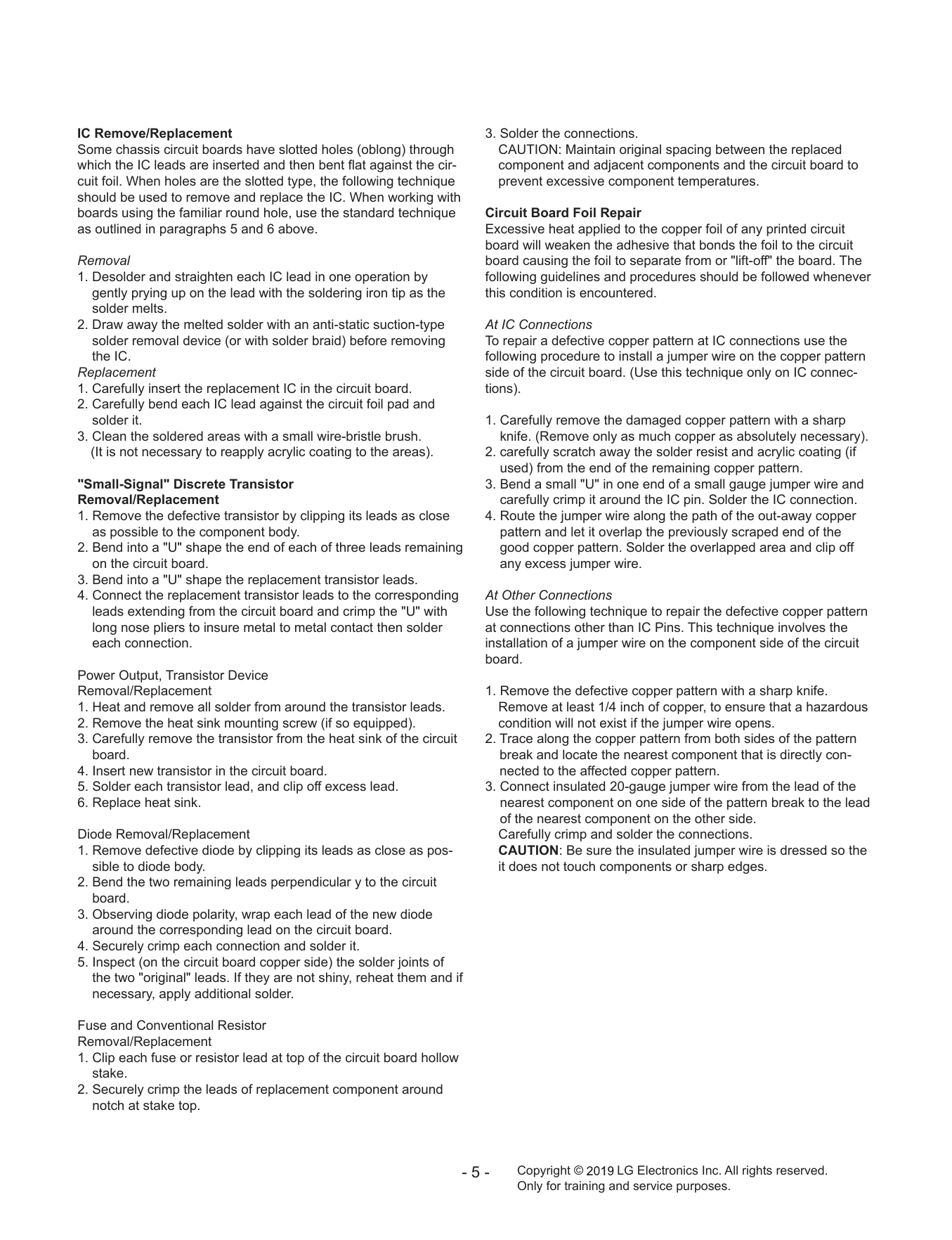
IC Remove/Replacement 3. Solder the connections.
Some chassis circuit boards have slotted holes (oblong) through CAUTION: Maintain original spacing between the replaced
which the IC leads are inserted and then bent flat against the cir- component and adjacent components and the circuit board to
cuit foil. When holes are the slotted type, the following technique prevent excessive component temperatures.
should be used to remove and replace the IC. When working with
boards using the familiar round hole, use the standard technique Circuit Board Foil Repair
as outlined in paragraphs 5 and 6 above. Excessive heat applied to the copper foil of any printed circuit
board will weaken the adhesive that bonds the foil to the circuit
Removal board causing the foil to separate from or "lift-off" the board. The
1. Desolder and straighten each IC lead in one operation by following guidelines and procedures should be followed whenever
gently prying up on the lead with the soldering iron tip as the this condition is encountered.
solder melts.
2. Draw away the melted solder with an anti-static suction-type At IC Connections
solder removal device (or with solder braid) before removing To repair a defective copper pattern at IC connections use the
the IC. following procedure to install a jumper wire on the copper pattern
Replacement side of the circuit board. (Use this technique only on IC connec-
1. Carefully insert the replacement IC in the circuit board. tions).
2. Carefully bend each IC lead against the circuit foil pad and
solder it. 1. Carefully remove the damaged copper pattern with a sharp
3. Clean the soldered areas with a small wire-bristle brush. knife. (Remove only as much copper as absolutely necessary).
(It is not necessary to reapply acrylic coating to the areas). 2. carefully scratch away the solder resist and acrylic coating (if
used) from the end of the remaining copper pattern.
"Small-Signal" Discrete Transistor 3. Bend a small "U" in one end of a small gauge jumper wire and
Removal/Replacement carefully crimp it around the IC pin. Solder the IC connection.
1. Remove the defective transistor by clipping its leads as close 4. Route the jumper wire along the path of the out-away copper
as possible to the component body. pattern and let it overlap the previously scraped end of the
2. Bend into a "U" shape the end of each of three leads remaining good copper pattern. Solder the overlapped area and clip off
on the circuit board. any excess jumper wire.
3. Bend into a "U" shape the replacement transistor leads.
4. Connect the replacement transistor leads to the corresponding At Other Connections
leads extending from the circuit board and crimp the "U" with Use the following technique to repair the defective copper pattern
long nose pliers to insure metal to metal contact then solder at connections other than IC Pins. This technique involves the
each connection. installation of a jumper wire on the component side of the circuit
board.
Power Output, Transistor Device
Removal/Replacement 1. Remove the defective copper pattern with a sharp knife.
1. Heat and remove all solder from around the transistor leads. Remove at least 1/4 inch of copper, to ensure that a hazardous
2. Remove the heat sink mounting screw (if so equipped). condition will not exist if the jumper wire opens.
3. Carefully remove the transistor from the heat sink of the circuit 2. Trace along the copper pattern from both sides of the pattern
board. break and locate the nearest component that is directly con-
4. Insert new transistor in the circuit board. nected to the affected copper pattern.
5. Solder each transistor lead, and clip off excess lead. 3. Connect insulated 20-gauge jumper wire from the lead of the
6. Replace heat sink. nearest component on one side of the pattern break to the lead
of the nearest component on the other side.
Diode Removal/Replacement Carefully crimp and solder the connections.
1. Remove defective diode by clipping its leads as close as pos- CAUTION: Be sure the insulated jumper wire is dressed so the
sible to diode body. it does not touch components or sharp edges.
2. Bend the two remaining leads perpendicular y to the circuit
board.
3. Observing diode polarity, wrap each lead of the new diode
around the corresponding lead on the circuit board.
4. Securely crimp each connection and solder it.
5. Inspect (on the circuit board copper side) the solder joints of
the two "original" leads. If they are not shiny, reheat them and if
necessary, apply additional solder.
Fuse and Conventional Resistor
Removal/Replacement
1. Clip each fuse or resistor lead at top of the circuit board hollow
stake.
2. Securely crimp the leads of replacement component around
notch at stake top.
-5- Copyright © LG Electronics Inc. All rights reserved.
Only for training and service purposes.
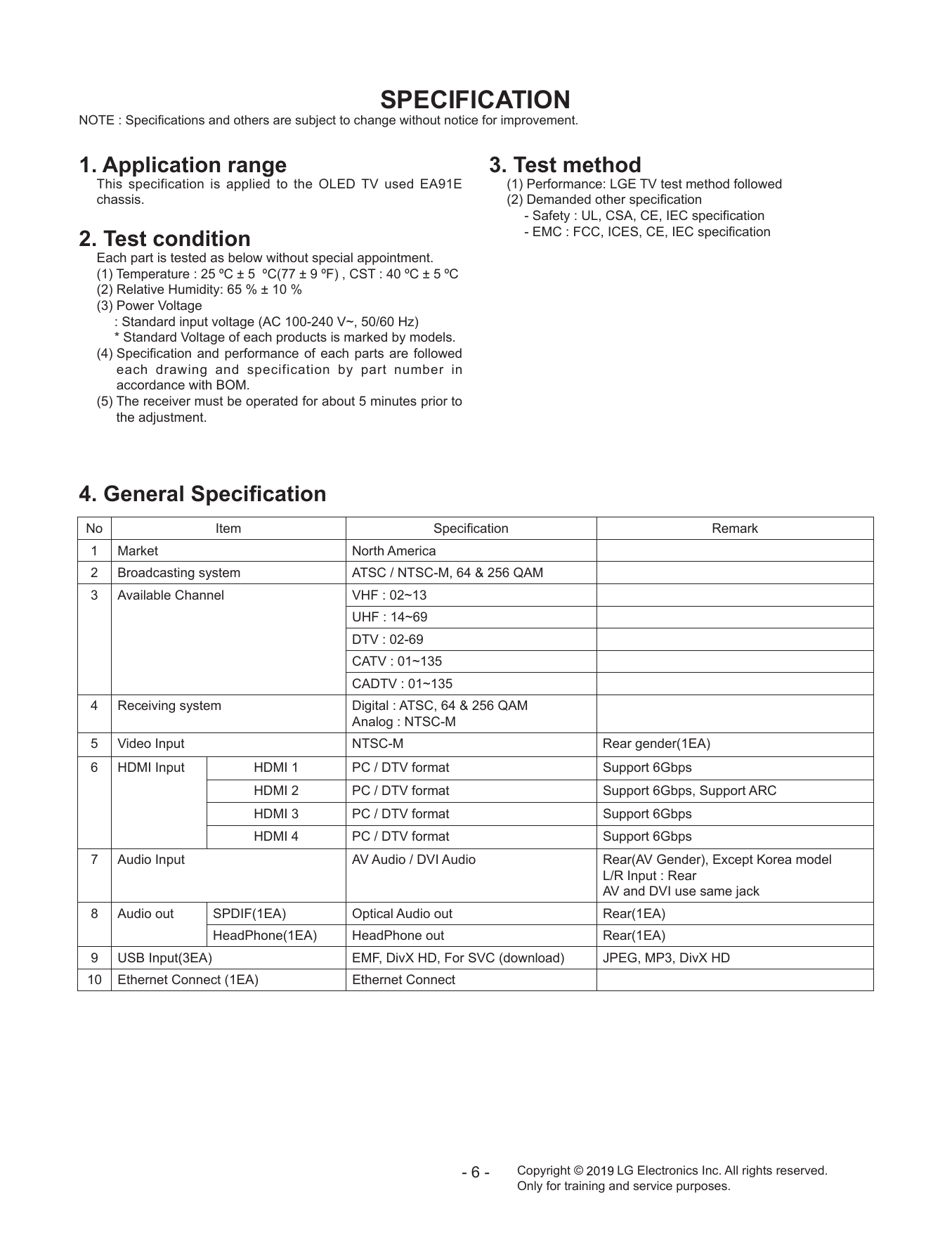
SPECIFICATION
NOTE : Specifications and others are subject to change without notice for improvement.
1. Application range 3. Test method
This specification is applied to the OLED TV used EA91E (1) Performance: LGE TV test method followed
chassis. (2) Demanded other specification
- Safety : UL, CSA, CE, IEC specification
- EMC : FCC, ICES, CE, IEC specification
2. Test condition
Each part is tested as below without special appointment.
(1) Temperature : 25 ºC ± 5 ºC(77 ± 9 ºF) , CST : 40 ºC ± 5 ºC
(2) Relative Humidity: 65 % ± 10 %
(3) Power Voltage
: Standard input voltage (AC 100-240 V~, 50/60 Hz)
* Standard Voltage of each products is marked by models.
(4) Specification and performance of each parts are followed
each drawing and specification by part number in
accordance with BOM.
(5) The receiver must be operated for about 5 minutes prior to
the adjustment.
4. General Specification
No Item Specification Remark
1 Market North America
2 Broadcasting system ATSC / NTSC-M, 64 & 256 QAM
3 Available Channel VHF : 02~13
UHF : 14~69
DTV : 02-69
CATV : 01~135
CADTV : 01~135
4 Receiving system Digital : ATSC, 64 & 256 QAM
Analog : NTSC-M
5 Video Input NTSC-M Rear gender(1EA)
6 HDMI Input HDMI 1 PC / DTV format Support 6Gbps
HDMI 2 PC / DTV format Support 6Gbps, Support ARC
HDMI 3 PC / DTV format Support 6Gbps
HDMI 4 PC / DTV format Support 6Gbps
7 Audio Input AV Audio / DVI Audio Rear(AV Gender), Except Korea model
L/R Input : Rear
AV and DVI use same jack
8 Audio out SPDIF(1EA) Optical Audio out Rear(1EA)
HeadPhone(1EA) HeadPhone out Rear(1EA)
9 USB Input(3EA) EMF, DivX HD, For SVC (download) JPEG, MP3, DivX HD
10 Ethernet Connect (1EA) Ethernet Connect
-6- Copyright © LG Electronics Inc. All rights reserved.
Only for training and service purposes.
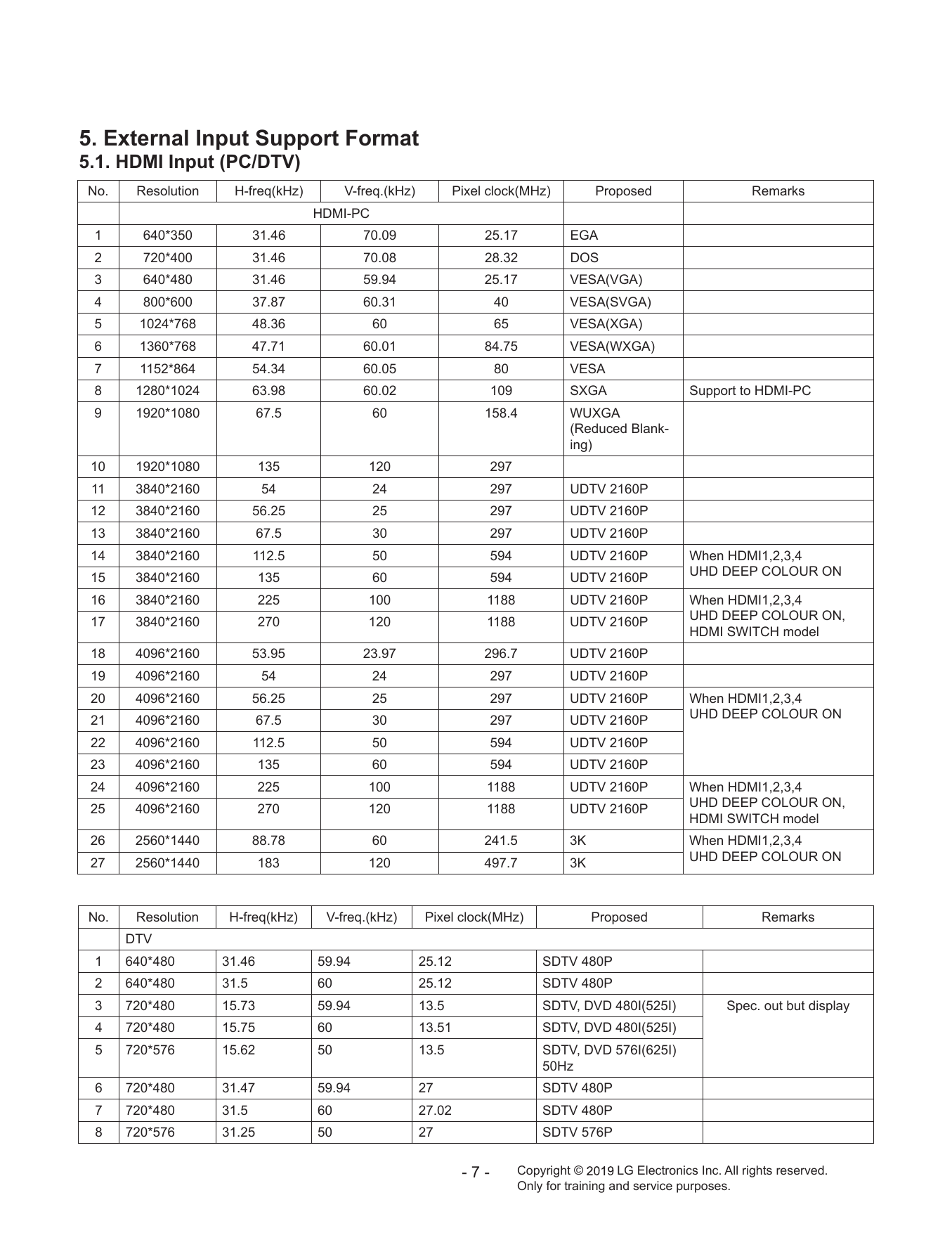
5. External Input Support Format
5.1. HDMI Input (PC/DTV)
No. Resolution H-freq(kHz) V-freq.(kHz) Pixel clock(MHz) Proposed Remarks
HDMI-PC
1 640*350 31.46 70.09 25.17 EGA
2 720*400 31.46 70.08 28.32 DOS
3 640*480 31.46 59.94 25.17 VESA(VGA)
4 800*600 37.87 60.31 40 VESA(SVGA)
5 1024*768 48.36 60 65 VESA(XGA)
6 1360*768 47.71 60.01 84.75 VESA(WXGA)
7 1152*864 54.34 60.05 80 VESA
8 1280*1024 63.98 60.02 109 SXGA Support to HDMI-PC
9 1920*1080 67.5 60 158.4 WUXGA
(Reduced Blank-
ing)
10 1920*1080 135 120 297
11 3840*2160 54 24 297 UDTV 2160P
12 3840*2160 56.25 25 297 UDTV 2160P
13 3840*2160 67.5 30 297 UDTV 2160P
14 3840*2160 112.5 50 594 UDTV 2160P When HDMI1,2,3,4
15 3840*2160 135 60 594 UDTV 2160P UHD DEEP COLOUR ON
16 3840*2160 225 100 1188 UDTV 2160P When HDMI1,2,3,4
17 3840*2160 270 120 1188 UDTV 2160P UHD DEEP COLOUR ON,
HDMI SWITCH model
18 4096*2160 53.95 23.97 296.7 UDTV 2160P
19 4096*2160 54 24 297 UDTV 2160P
20 4096*2160 56.25 25 297 UDTV 2160P When HDMI1,2,3,4
21 4096*2160 67.5 30 297 UDTV 2160P UHD DEEP COLOUR ON
22 4096*2160 112.5 50 594 UDTV 2160P
23 4096*2160 135 60 594 UDTV 2160P
24 4096*2160 225 100 1188 UDTV 2160P When HDMI1,2,3,4
25 4096*2160 270 120 1188 UDTV 2160P UHD DEEP COLOUR ON,
HDMI SWITCH model
26 2560*1440 88.78 60 241.5 3K When HDMI1,2,3,4
27 2560*1440 183 120 497.7 3K UHD DEEP COLOUR ON
No. Resolution H-freq(kHz) V-freq.(kHz) Pixel clock(MHz) Proposed Remarks
DTV
1 640*480 31.46 59.94 25.12 SDTV 480P
2 640*480 31.5 60 25.12 SDTV 480P
3 720*480 15.73 59.94 13.5 SDTV, DVD 480I(525I) Spec. out but display
4 720*480 15.75 60 13.51 SDTV, DVD 480I(525I)
5 720*576 15.62 50 13.5 SDTV, DVD 576I(625I)
50Hz
6 720*480 31.47 59.94 27 SDTV 480P
7 720*480 31.5 60 27.02 SDTV 480P
8 720*576 31.25 50 27 SDTV 576P
-7- Copyright © LG Electronics Inc. All rights reserved.
Only for training and service purposes.
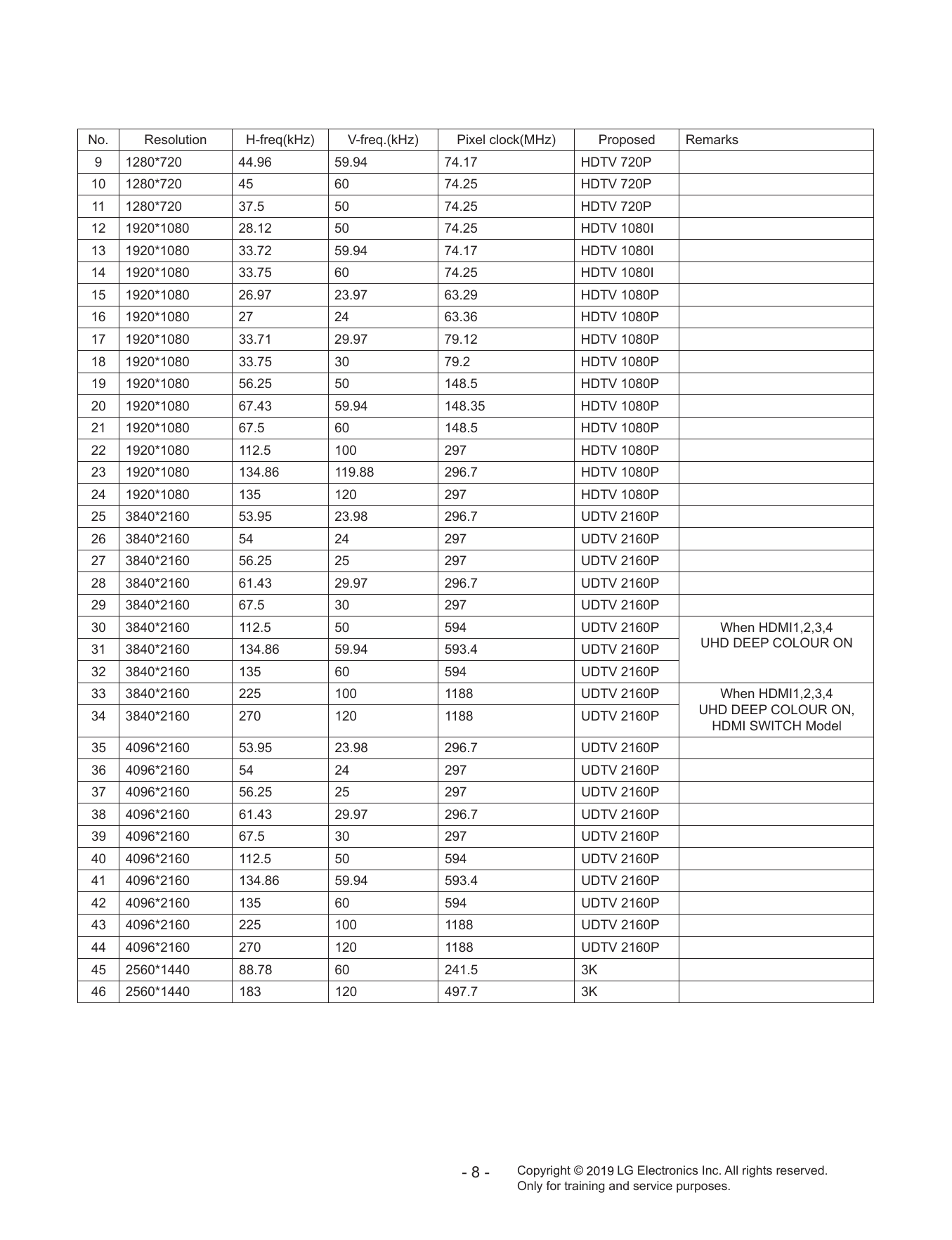
No. Resolution H-freq(kHz) V-freq.(kHz) Pixel clock(MHz) Proposed Remarks
9 1280*720 44.96 59.94 74.17 HDTV 720P
10 1280*720 45 60 74.25 HDTV 720P
11 1280*720 37.5 50 74.25 HDTV 720P
12 1920*1080 28.12 50 74.25 HDTV 1080I
13 1920*1080 33.72 59.94 74.17 HDTV 1080I
14 1920*1080 33.75 60 74.25 HDTV 1080I
15 1920*1080 26.97 23.97 63.29 HDTV 1080P
16 1920*1080 27 24 63.36 HDTV 1080P
17 1920*1080 33.71 29.97 79.12 HDTV 1080P
18 1920*1080 33.75 30 79.2 HDTV 1080P
19 1920*1080 56.25 50 148.5 HDTV 1080P
20 1920*1080 67.43 59.94 148.35 HDTV 1080P
21 1920*1080 67.5 60 148.5 HDTV 1080P
22 1920*1080 112.5 100 297 HDTV 1080P
23 1920*1080 134.86 119.88 296.7 HDTV 1080P
24 1920*1080 135 120 297 HDTV 1080P
25 3840*2160 53.95 23.98 296.7 UDTV 2160P
26 3840*2160 54 24 297 UDTV 2160P
27 3840*2160 56.25 25 297 UDTV 2160P
28 3840*2160 61.43 29.97 296.7 UDTV 2160P
29 3840*2160 67.5 30 297 UDTV 2160P
30 3840*2160 112.5 50 594 UDTV 2160P When HDMI1,2,3,4
31 3840*2160 134.86 59.94 593.4 UDTV 2160P UHD DEEP COLOUR ON
32 3840*2160 135 60 594 UDTV 2160P
33 3840*2160 225 100 1188 UDTV 2160P When HDMI1,2,3,4
34 3840*2160 270 120 1188 UDTV 2160P UHD DEEP COLOUR ON,
HDMI SWITCH Model
35 4096*2160 53.95 23.98 296.7 UDTV 2160P
36 4096*2160 54 24 297 UDTV 2160P
37 4096*2160 56.25 25 297 UDTV 2160P
38 4096*2160 61.43 29.97 296.7 UDTV 2160P
39 4096*2160 67.5 30 297 UDTV 2160P
40 4096*2160 112.5 50 594 UDTV 2160P
41 4096*2160 134.86 59.94 593.4 UDTV 2160P
42 4096*2160 135 60 594 UDTV 2160P
43 4096*2160 225 100 1188 UDTV 2160P
44 4096*2160 270 120 1188 UDTV 2160P
45 2560*1440 88.78 60 241.5 3K
46 2560*1440 183 120 497.7 3K
-8- Copyright © LG Electronics Inc. All rights reserved.
Only for training and service purposes.
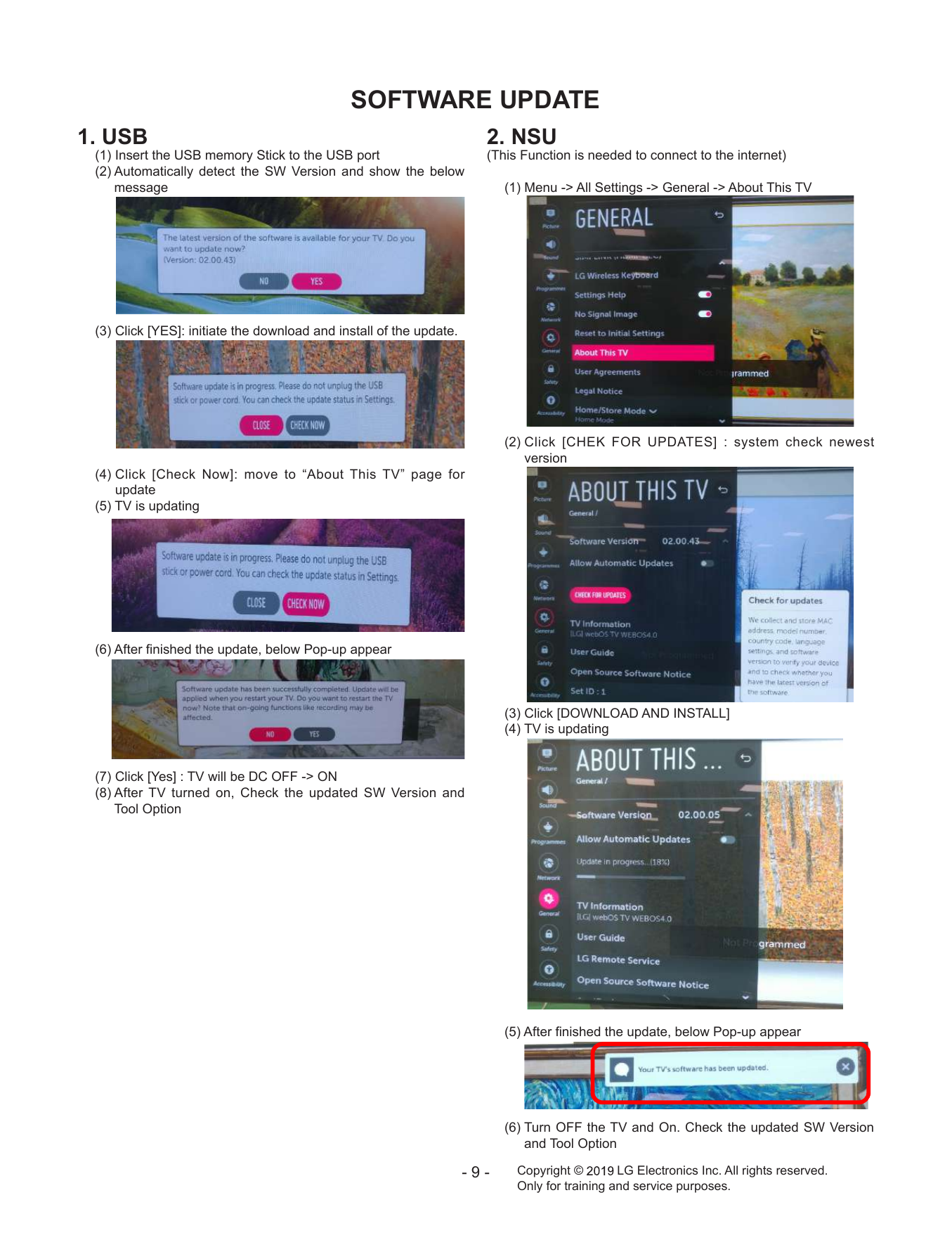
SOFTWARE UPDATE
1. USB 2. NSU
(1) Insert the USB memory Stick to the USB port (This Function is needed to connect to the internet)
(2) Automatically detect the SW Version and show the below
message (1) Menu -> All Settings -> General -> About This TV
(3) Click [YES]: initiate the download and install of the update.
(2) C lick [CHEK FOR UPDATES] : system check newest
version
(4) C lick [Check Now]: move to “About This TV” page for
update
(5) TV is updating
(6) After finished the update, below Pop-up appear
(3) Click [DOWNLOAD AND INSTALL]
(4) TV is updating
(7) Click [Yes] : TV will be DC OFF -> ON
(8) After TV turned on, Check the updated SW Version and
Tool Option
(5) After finished the update, below Pop-up appear
(6) Turn OFF the TV and On. Check the updated SW Version
and Tool Option
-9- Copyright © LG Electronics Inc. All rights reserved.
Only for training and service purposes.
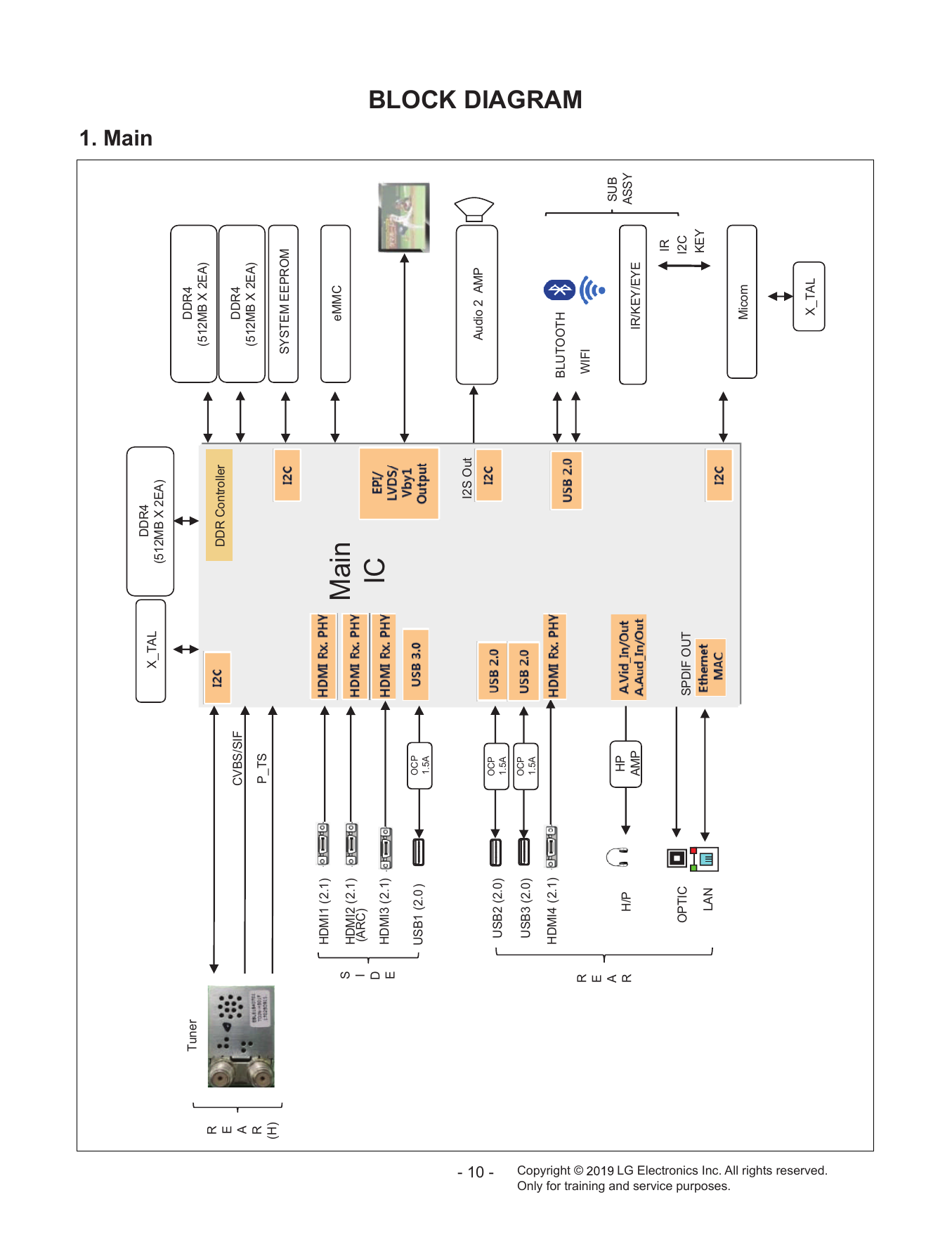
DDR4 1. Main
X_TAL
(512MB X 2EA)
Tuner DDR4
(512MB X 2EA)
R
DDR Controller
E
CVBS/SIF DDR4
A
(512MB X 2EA)
R P_TS
(H)
SYSTEM EEPROM
HDMI1 (2.1)
eMMC
S HDMI2 (2.1) Main
I (ARC)
D
E HDMI3 (2.1) IC
OCP
USB1 (2.0 )
1.5A
I2S Out
Audio 2 AMP
- 10 -
OCP
USB2 (2.0) 1.5A
OCP
USB3 (2.0) 1.5A
HDMI4 (2.1)
BLUTOOTH
Copyright ©
BLOCK DIAGRAM
R WIFI
E
A SUB
H/P HP
R ASSY
AMP IR/KEY/EYE
IR
OPTIC SPDIF OUT I2C
KEY
LAN
Only for training and service purposes.
Micom
X_TAL
LG Electronics Inc. All rights reserved.
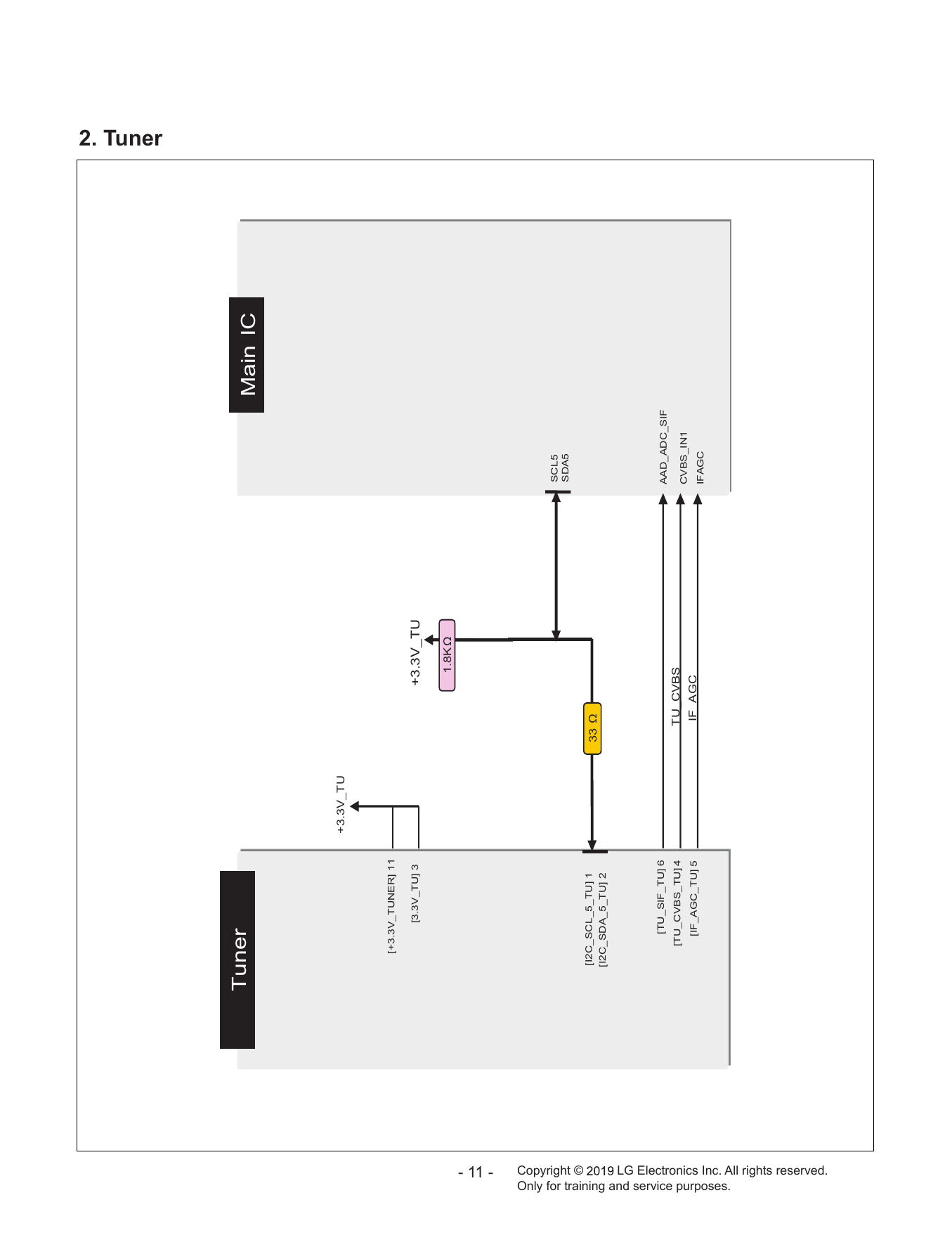
2. Tuner
Tuner Main IC
+3.3V_TU
[+3.3V_TUNER] 11
[3.3V_TU] 3 +3.3V_TU
1.8KΩ
- 11 -
SCL5
SDA5
Copyright ©
[I2C_SCL_5_TU] 1
33 Ω
[I2C_SDA_5_TU] 2
[TU_SIF_TU] 6 AAD_ADC_SIF
[TU_CVBS_TU] 4 TU_CVBS
CVBS_IN1
[IF_AGC_TU] 5 IF_AGC
IFAGC
Only for training and service purposes.
LG Electronics Inc. All rights reserved.
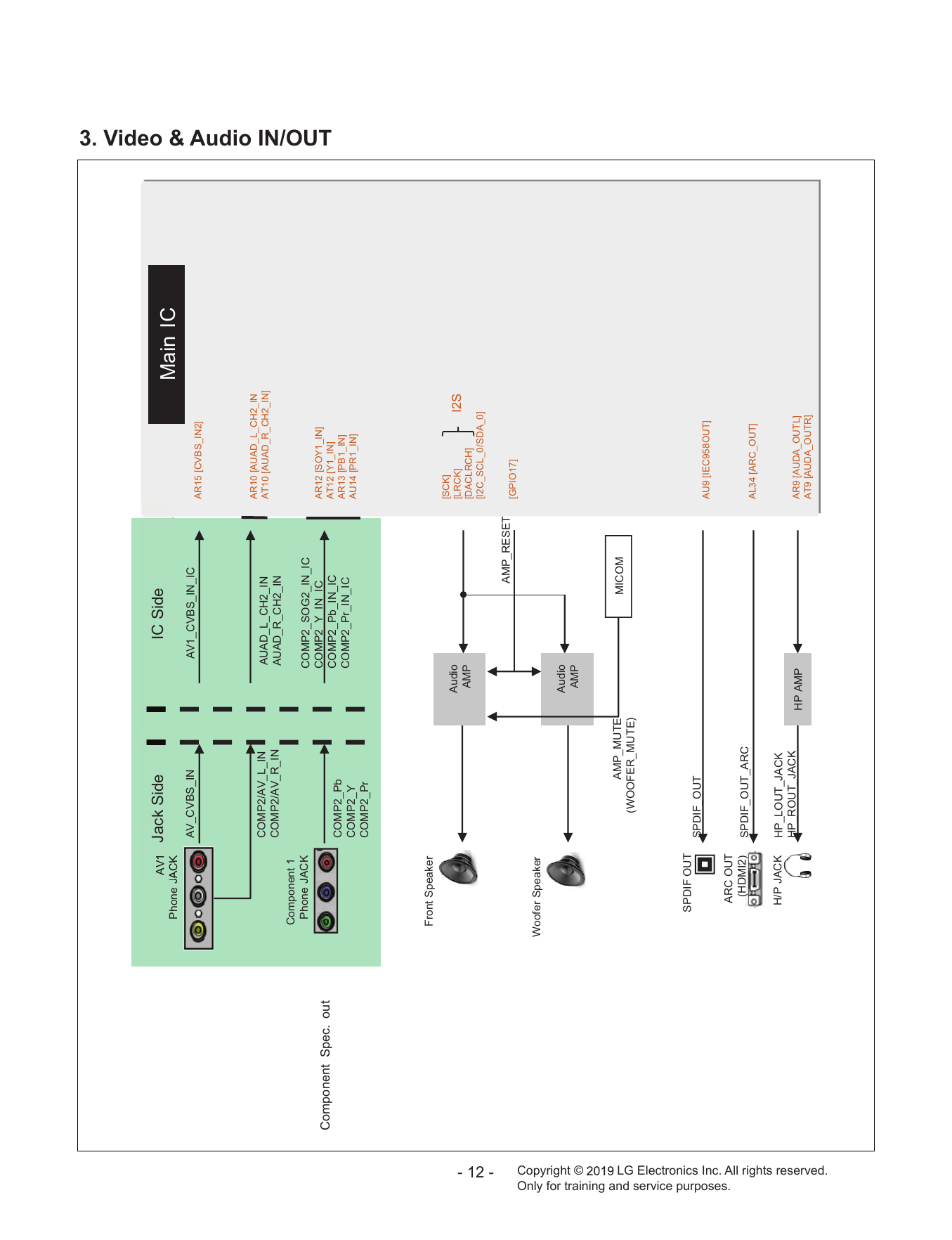
A
AV
AV11 Jack Side IC Side
JACK
Phone JACK Main IC
AV_CVBS_IN AV1_CVBS_IN_IC
AR15 [CVBS_IN2]
AR10 [AUAD_L_CH2_IN
COMP2/AV_L_IN AUAD_L_CH2_IN AT10 [AUAD_R_CH2_IN]
COMP2/AV_R_IN AUAD_R_CH2_IN
Component 1
Phone JACK COMP2_SOG2_IN_IC
COMP2_Y_IN_IC AR12 [SOY1_IN]
3. Video & Audio IN/OUT
Component Spec. out COMP2_Pb_IN_IC AT12 [Y1_IN]
COMP2_Pb AR13 [PB1_IN]
COMP2_Pr_IN_IC
COMP2_Y AU14 [PR1_IN]
COMP2_Pr
Front Speaker
[SCK]
Audio [LRCK] I2S
AMP [DACLRCH]
[I2C_SCL_0/SDA_0]
- 12 -
AMP_RESET
[GPIO17]
Woofer Speaker
Audio
AMP
Copyright ©
AMP_MUTE MICOM
(WOOFER_MUTE)
SPDIF OUT
SPDIF_OUT
AU9 [IEC958OUT]
Only for training and service purposes.
ARC OUT
(HDMI2) SPDIF_OUT_ARC
AL34 [ARC_OUT]
H/P JACK HP_LOUT_JACK
HP_ROUT_JACK AR9 [AUDA_OUTL]
HP AMP
AT9 [AUDA_OUTR]
LG Electronics Inc. All rights reserved.
HDMI UEI Detect
(Each Port #17) X-tal S-Flash 3.3V 0.95V
4Pin 4Pin-UART
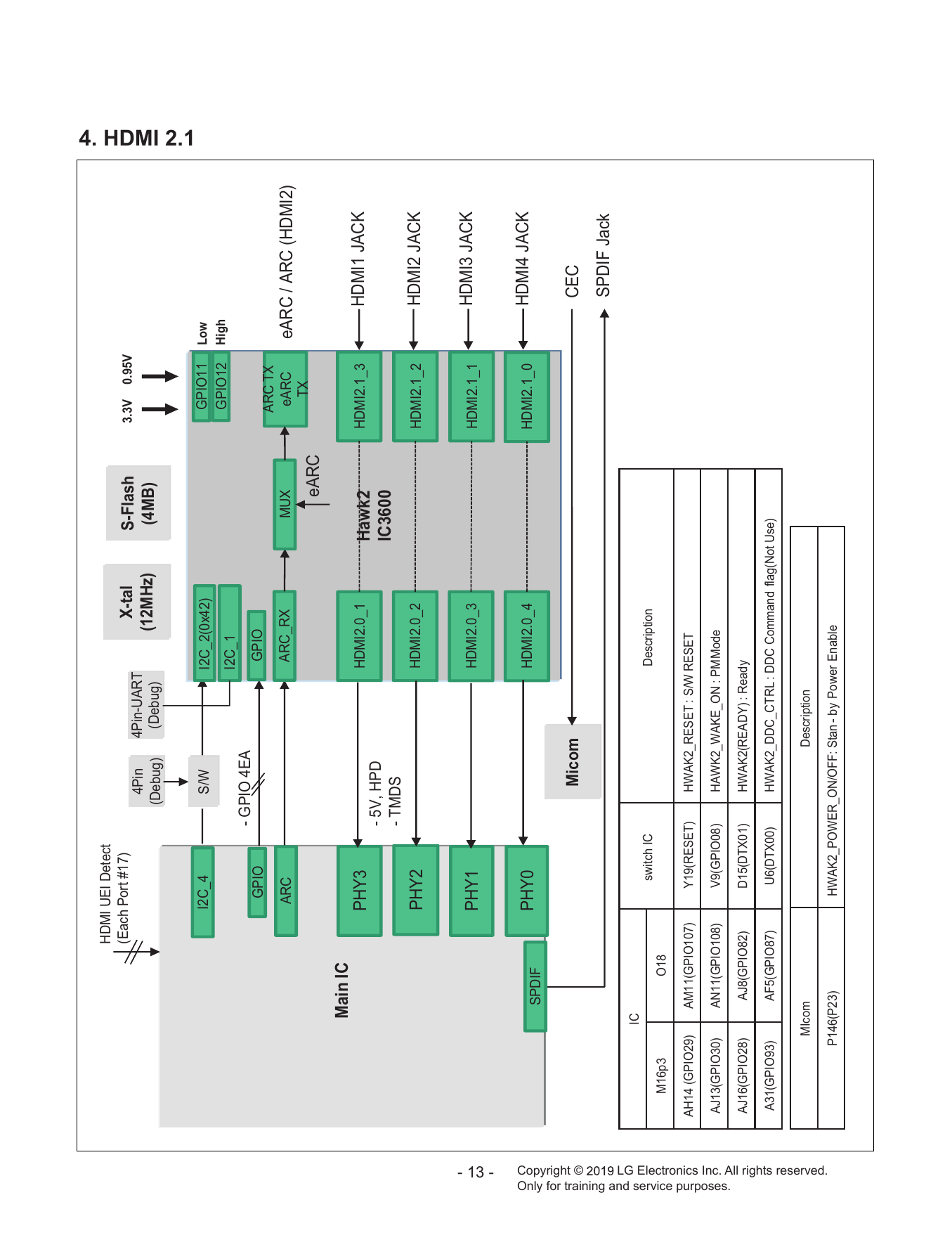
(Debug) (Debug) (12MHz) (4MB) 4. HDMI 2.1
I2C_4 S/W I2C_2(0x42) GPIO11 Low
GPIO12 High
I2C_1
- GPIO 4EA
GPIO GPIO
ARC TX
ARC ARC_RX MUX eARC eARC / ARC (HDMI2)
TX
eARC
Main IC
PHY3 HDMI2.0_1 Hawk2 HDMI2.1_3 HDMI1 JACK
- 5V, HPD
IC3600
- TMDS
PHY2 HDMI2.0_2 HDMI2.1_2 HDMI2 JACK
PHY1 HDMI2.0_3 HDMI2.1_1 HDMI3 JACK
- 13 -
PHY0 HDMI2.0_4 HDMI2.1_0 HDMI4 JACK
SPDIF
Copyright ©
Micom CEC
SPDIF Jack
IC
switch IC Description
M16p3 O18
AH14 (GPIO29) AM11(GPIO107) Y19(RESET) HWAK2_RESET : S/W RESET
AJ13(GPIO30) AN11(GPIO108) V9(GPIO08) HAWK2_WAKE_ON : PM Mode
Only for training and service purposes.
AJ16(GPIO28) AJ8(GPIO82) D15(DTX01) HWAK2(READY) : Ready
A31(GPIO93) AF5(GPIO87) U6(DTX00) HWAK2_DDC_CTRL : DDC Command flag(Not Use)
MIcom Description
LG Electronics Inc. All rights reserved.
P146(P23) HWAK2_POWER_ON/OFF: Stan - by Power Enable
Main IC
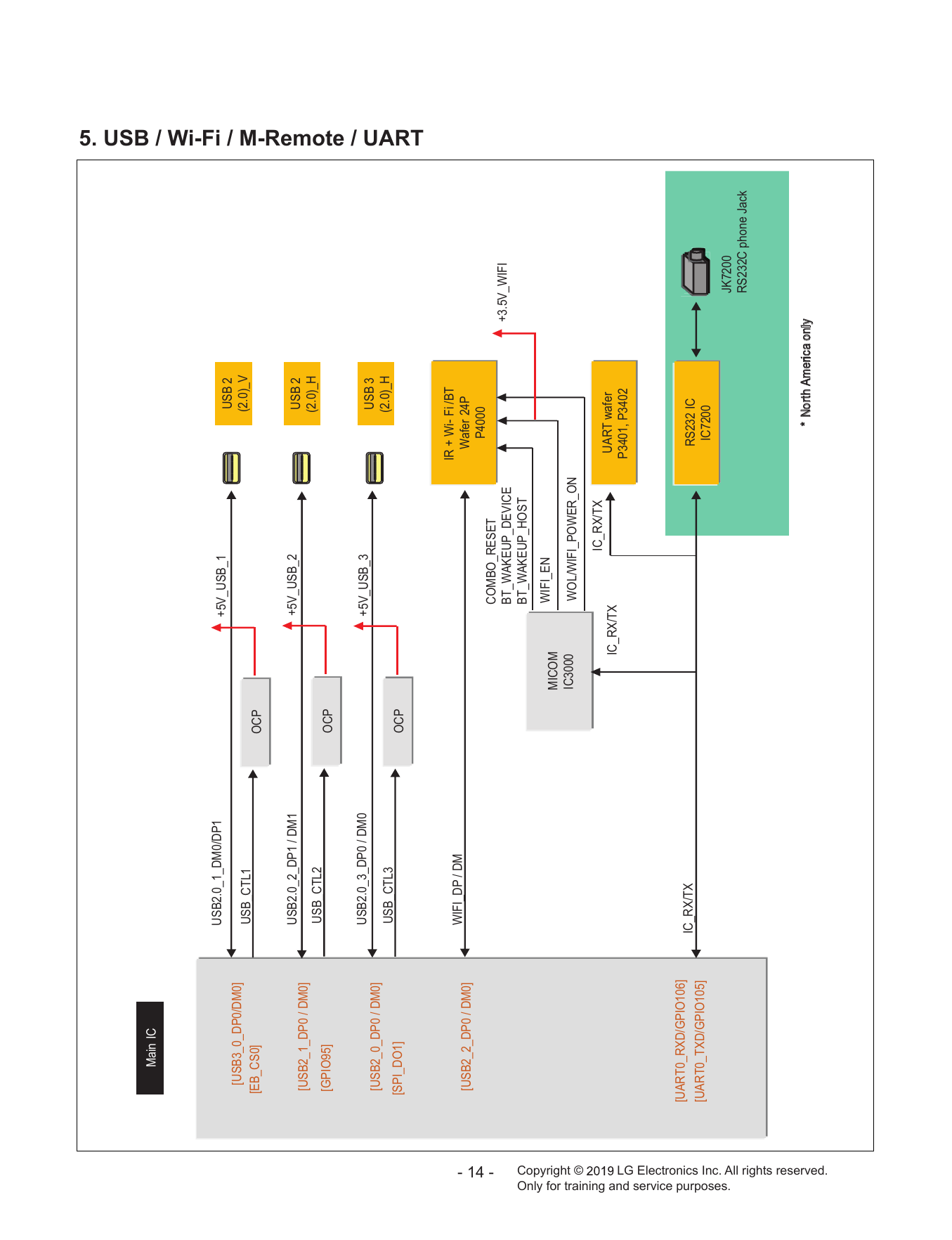
USB2.0_1_DM0/DP1 +5V_USB_1 USB 2
[USB3_0_DP0/DM0] (2.0)_V
USB_CTL1
[EB_CS0] OCP
USB2.0_2_DP1 / DM1 +5V_USB_2 USB 2
[USB2_1_DP0 / DM0]
USB_CTL2 (2.0)_H
[GPIO95] OCP
USB2.0_3_DP0 / DM0 +5V_USB_3
[USB2_0_DP0 / DM0] USB 3
USB_CTL3 (2.0)_H
[SPI_DO1] OCP
5. USB / Wi-Fi / M-Remote / UART
IR + Wi- Fi /BT
WIFI_DP / DM
[USB2_2_DP0 / DM0] Wafer 24P
P4000
- 14 -
COMBO_RESET
BT_WAKEUP_DEVICE +3.5V_WIFI
BT_WAKEUP_HOST
WIFI_EN
MICOM
IC3000 WOL/WIFI_POWER_ON
Copyright ©
IC_RX/TX
IC_RX/TX UART wafer
P3401, P3402
[UART0_RXD/GPIO106]
IC_RX/TX RS232 IC
[UART0_TXD/GPIO105] IC7200
Only for training and service purposes.
JK7200
RS232C phone Jack
* North America only
LG Electronics Inc. All rights reserved.
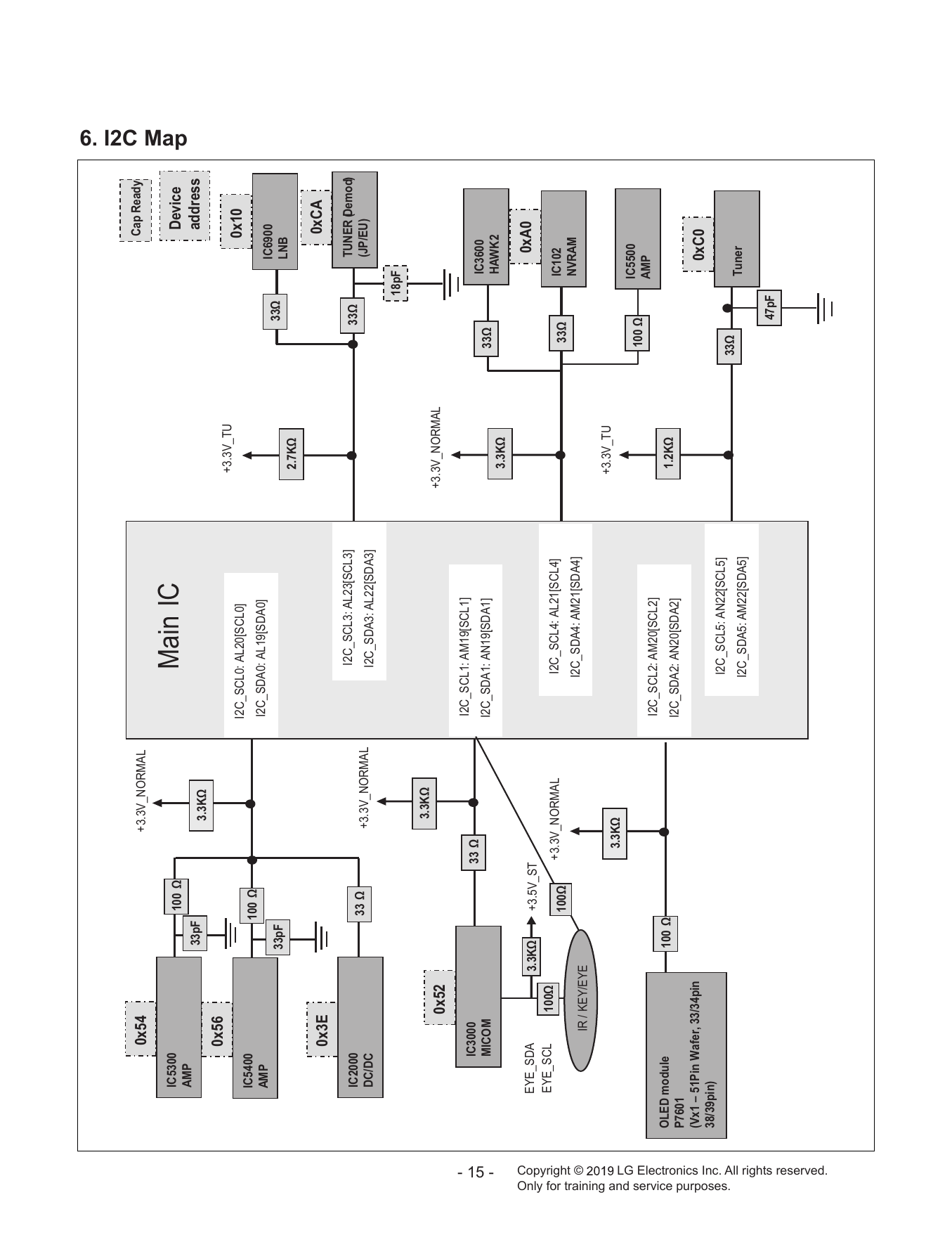
0x54 +3.3V_NORMAL Cap Ready
IC5300 100 Ω Device
6. I2C Map
AMP
Main IC
33pF 3.3KΩ address
0x56
+3.3V_TU
I2C_SCL0: AL20[SCL0] 0x10
IC5400 100 Ω
AMP I2C_SDA0: AL19[SDA0]
IC6900
33pF 33Ω
LNB
2.7KΩ
0x3E 0xCA
IC2000 I2C_SCL3: AL23[SCL3] 33Ω TUNER (Demod)
33 Ω +3.3V_NORMAL (JP/EU)
DC/DC I2C_SDA3: AL22[SDA3]
18pF
3.3KΩ
0x52 +3.3V_NORMAL
I2C_SCL1: AM19[SCL1]
IC3000 33 Ω IC3600
- 15 -
MICOM I2C_SDA1: AN19[SDA1] 33Ω
3.3KΩ HAWK2
EYE_SDA 3.3KΩ +3.5V_ST 0xA0
EYE_SCL 100Ω +3.3V_NORMAL I2C_SCL4: AL21[SCL4] IC102
100Ω 33Ω
NVRAM
Copyright ©
I2C_SDA4: AM21[SDA4]
IR / KEY/EYE
+3.3V_TU
3.3KΩ
IC5500
100 Ω
AMP
I2C_SCL2: AM20[SCL2]
OLED module 100 Ω 1.2KΩ
P7601 I2C_SDA2: AN20[SDA2]
(Vx1 – 51Pin Wafer, 33/34pin 0xC0
38/39pin)
I2C_SCL5: AN22[SCL5]
Only for training and service purposes.
33Ω
I2C_SDA5: AM22[SDA5] Tuner
47pF
LG Electronics Inc. All rights reserved.
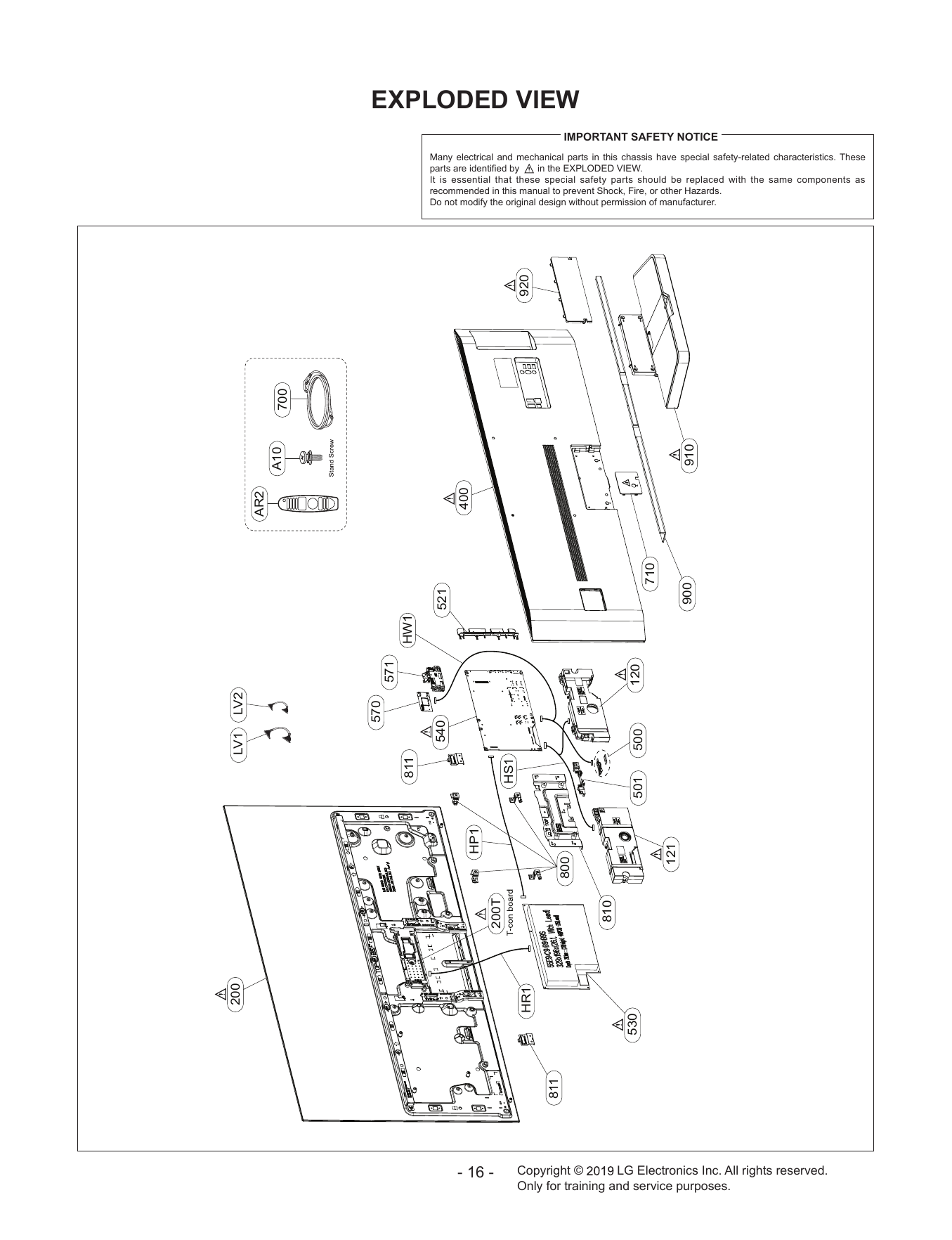
EXPLODED VIEW
IMPORTANT SAFETY NOTICE
Many electrical and mechanical parts in this chassis have special safety-related characteristics. These
parts are identified by in the EXPLODED VIEW.
It is essential that these special safety parts should be replaced with the same components as
recommended in this manual to prevent Shock, Fire, or other Hazards.
Do not modify the original design without permission of manufacturer.
920
700
910
A10
400
AR2
710
900
521
HW1
571
120
LV2
570
540
500
LV1
811
HS1
501
HP1
121
800
200T
810
200
HR1
530
811
- 16 - Copyright © LG Electronics Inc. All rights reserved.
Only for training and service purposes.
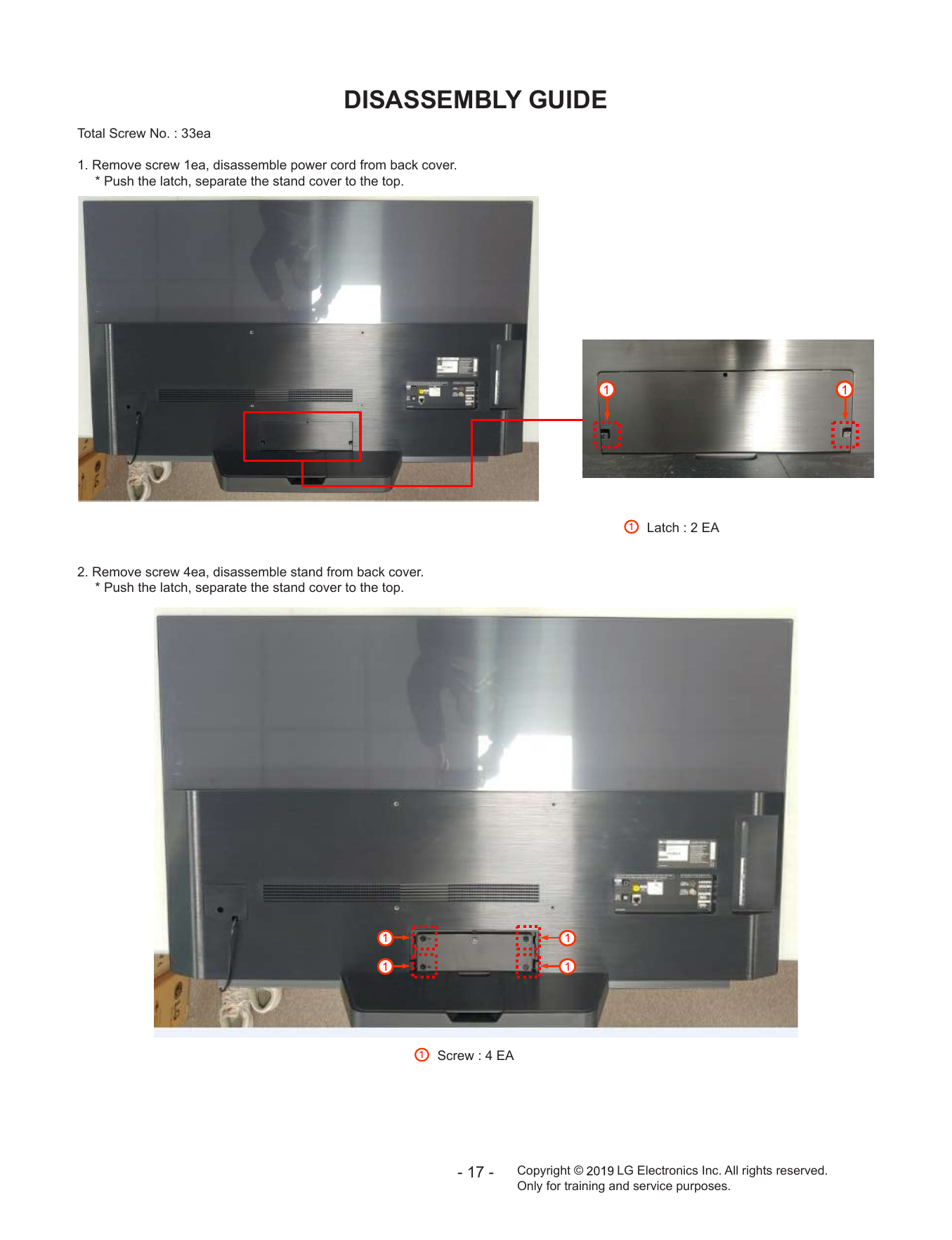
DISASSEMBLY GUIDE
Total Screw No. : 33ea
1. Remove screw 1ea, disassemble power cord from back cover.
* Push the latch, separate the stand cover to the top.
1 1
1 Latch : 2 EA
2. Remove screw 4ea, disassemble stand from back cover.
* Push the latch, separate the stand cover to the top.
1 1
1 1
1 Screw : 4 EA
- 17 - Copyright © LG Electronics Inc. All rights reserved.
Only for training and service purposes.
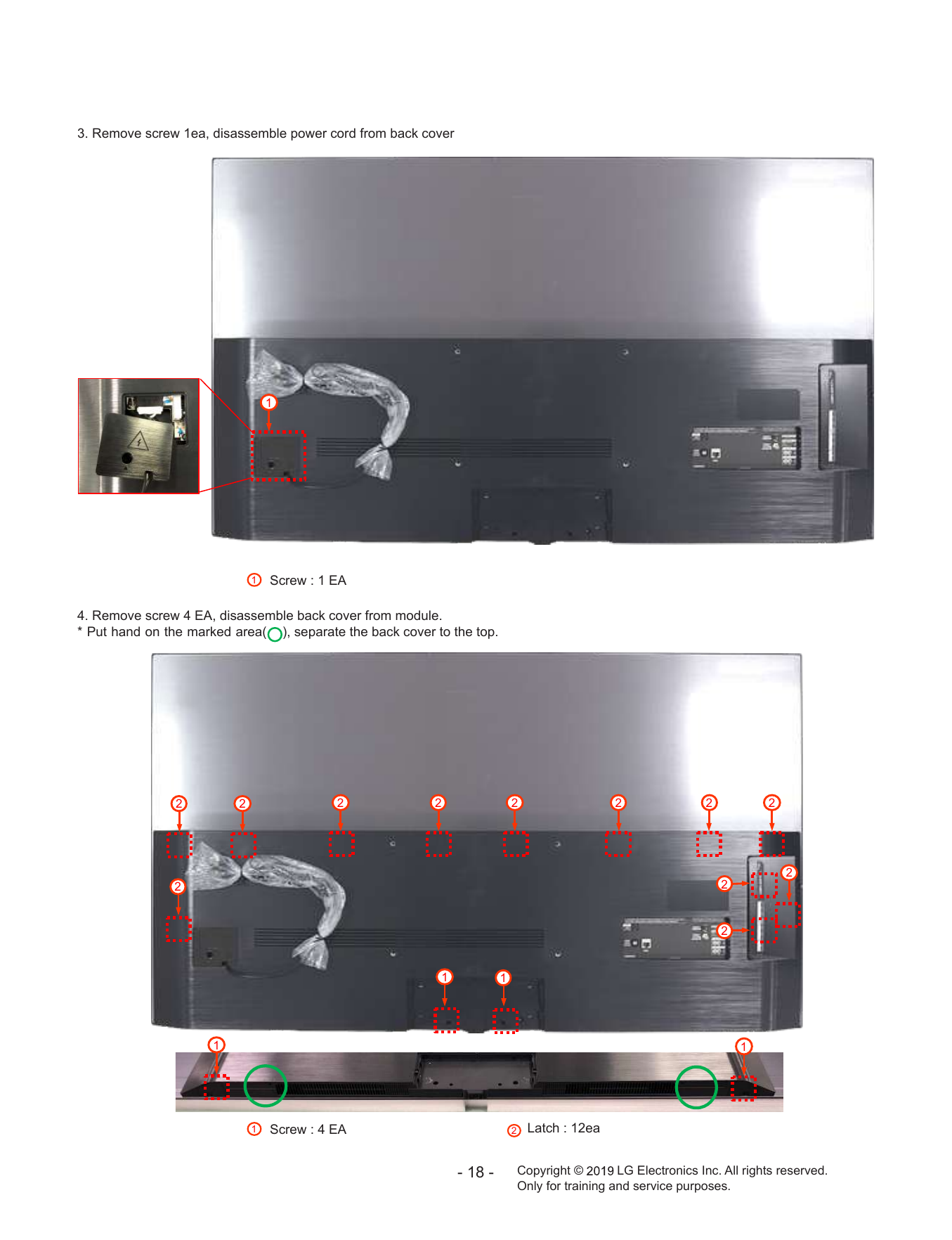
3. Remove screw 1ea, disassemble power cord from back cover
`
1
1 Screw : 1 EA
4. Remove screw 4 EA, disassemble back cover from module.
* Put hand on the marked area( ), separate the back cover to the top.
2 2 2 2 2 2 2 2
2
2 2
2
1 1
1 1
1 Screw : 4 EA 2 Latch : 12ea
- 18 - Copyright © LG Electronics Inc. All rights reserved.
Only for training and service purposes.
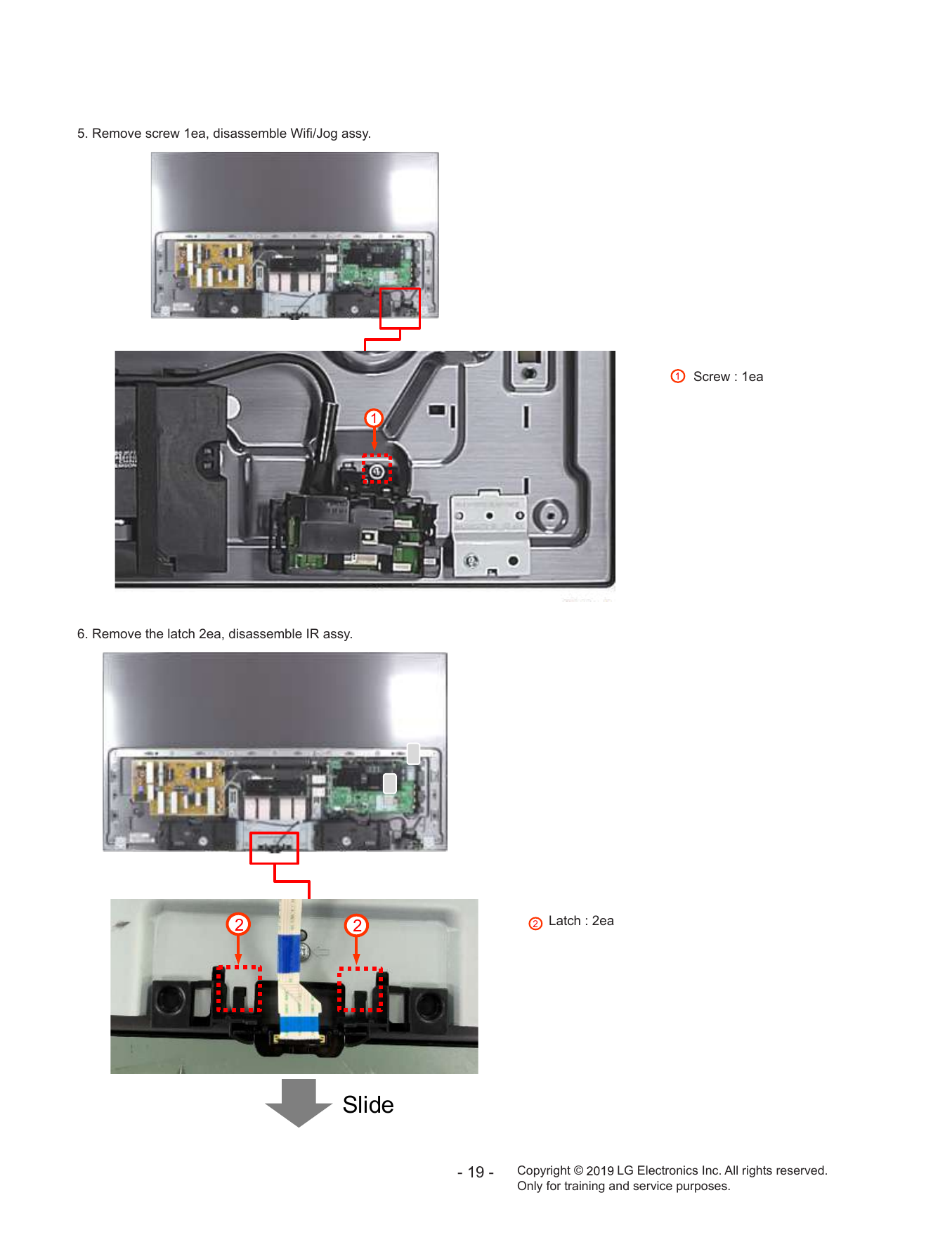
5. Remove screw 1ea, disassemble Wifi/Jog assy.
1 Screw : 1ea
1
6. Remove the latch 2ea, disassemble IR assy.
2 2 2 Latch : 2ea
Slide
- 19 - Copyright © LG Electronics Inc. All rights reserved.
Only for training and service purposes.
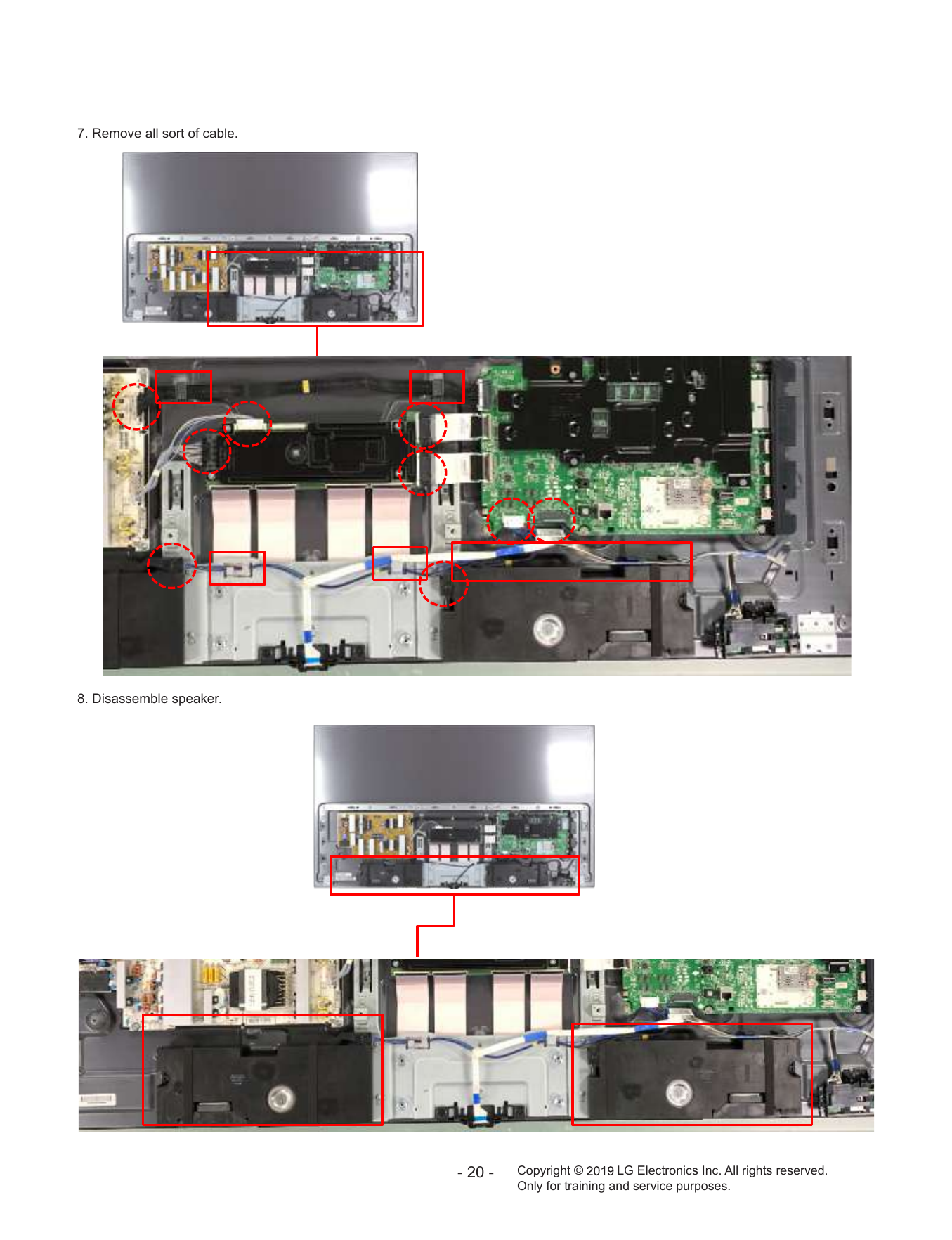
7. Remove all sort of cable.
8. Disassemble speaker.
- 20 - Copyright © LG Electronics Inc. All rights reserved.
Only for training and service purposes.
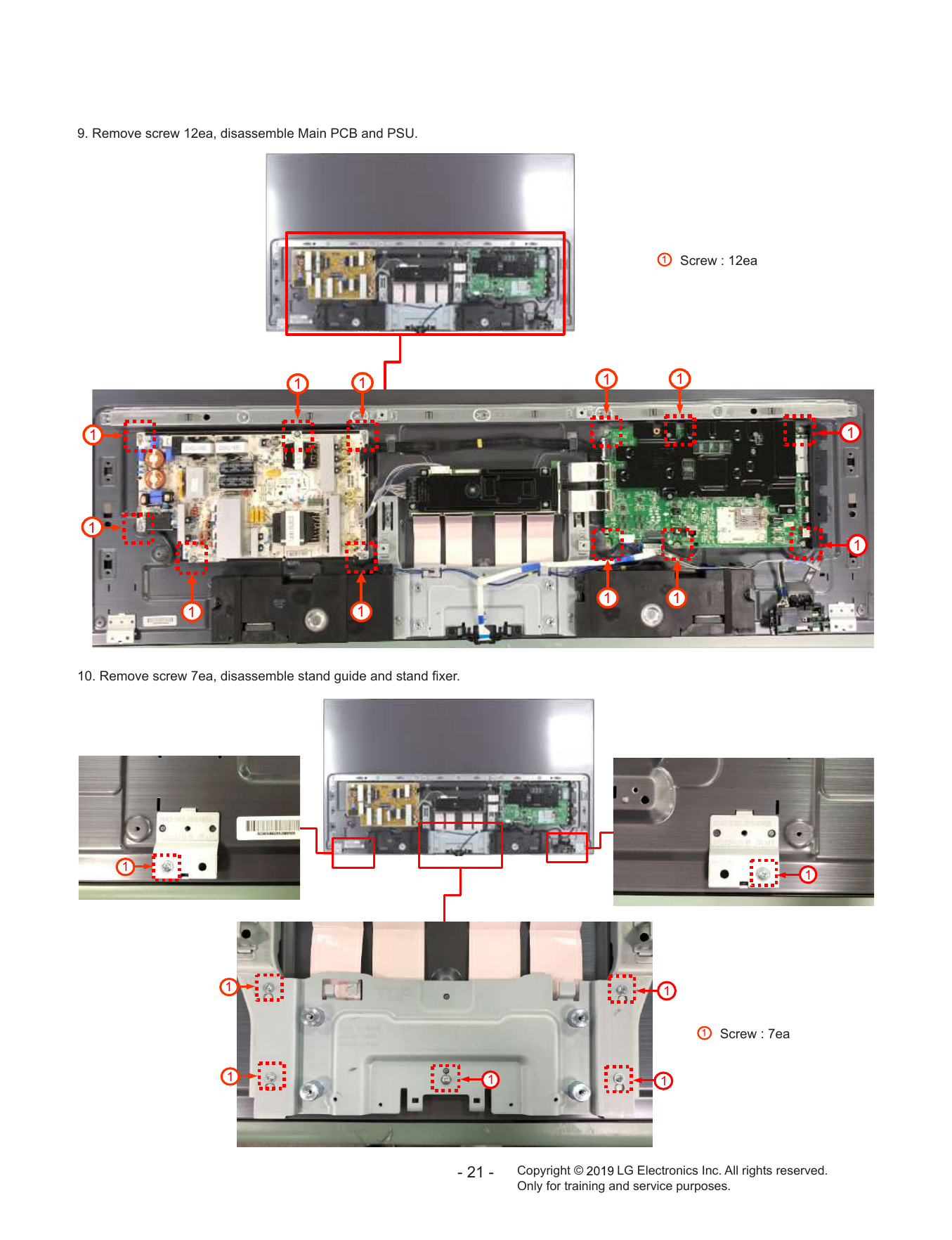
9. Remove screw 12ea, disassemble Main PCB and PSU.
1 Screw : 12ea
1 1 1 1
1 1
1
1
1 1
1 1
10. Remove screw 7ea, disassemble stand guide and stand fixer.
1
1
1 1
1 Screw : 7ea
1 1 1
- 21 - Copyright © LG Electronics Inc. All rights reserved.
Only for training and service purposes.
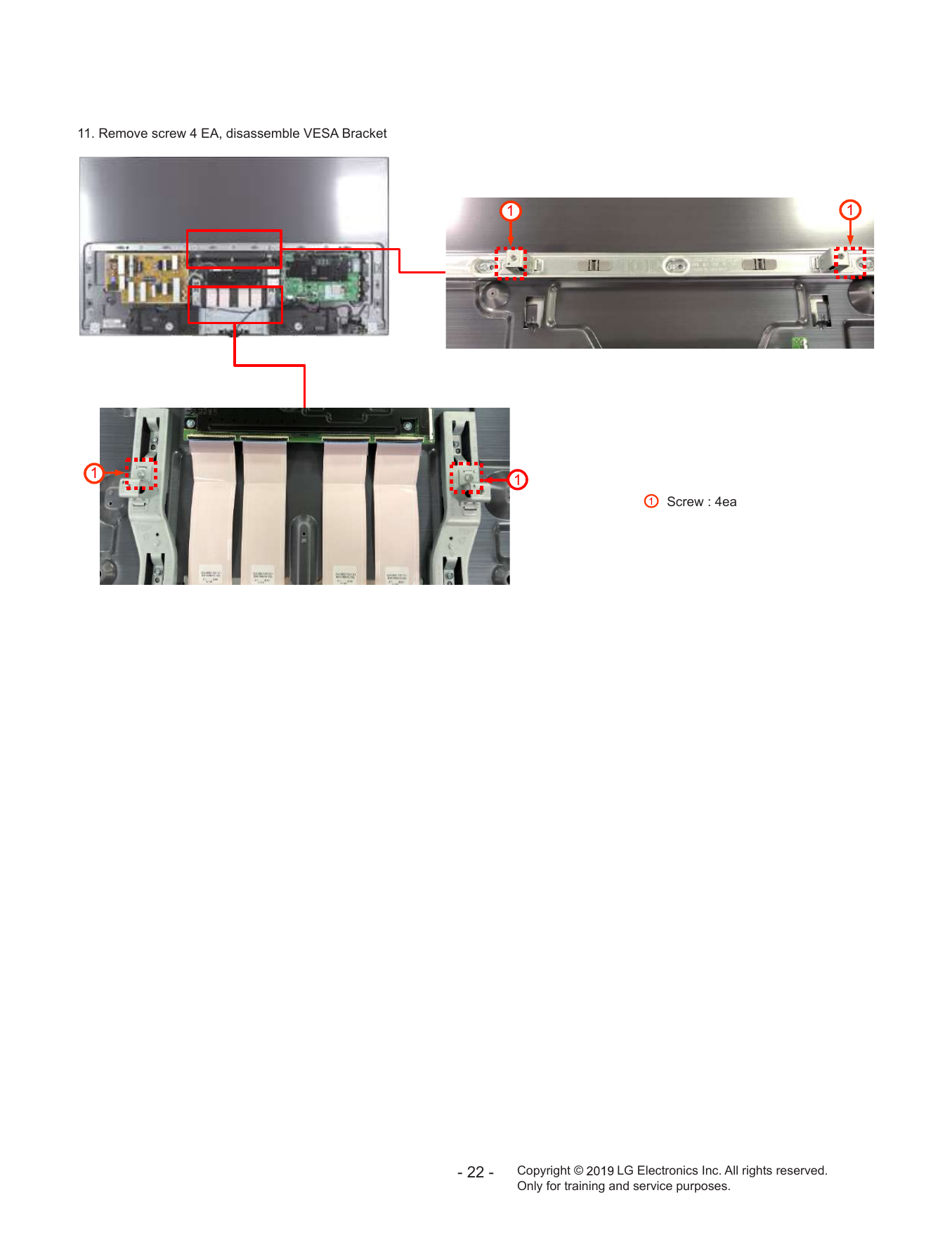
11. Remove screw 4 EA, disassemble VESA Bracket
1 1
1 1
1 Screw : 4ea
- 22 - Copyright © LG Electronics Inc. All rights reserved.
Only for training and service purposes.
TROUBLE SHOOTING GUIDE
Copyright © 2019 LG Electronics Inc. All rights reserved.
Only for training and service purposes.
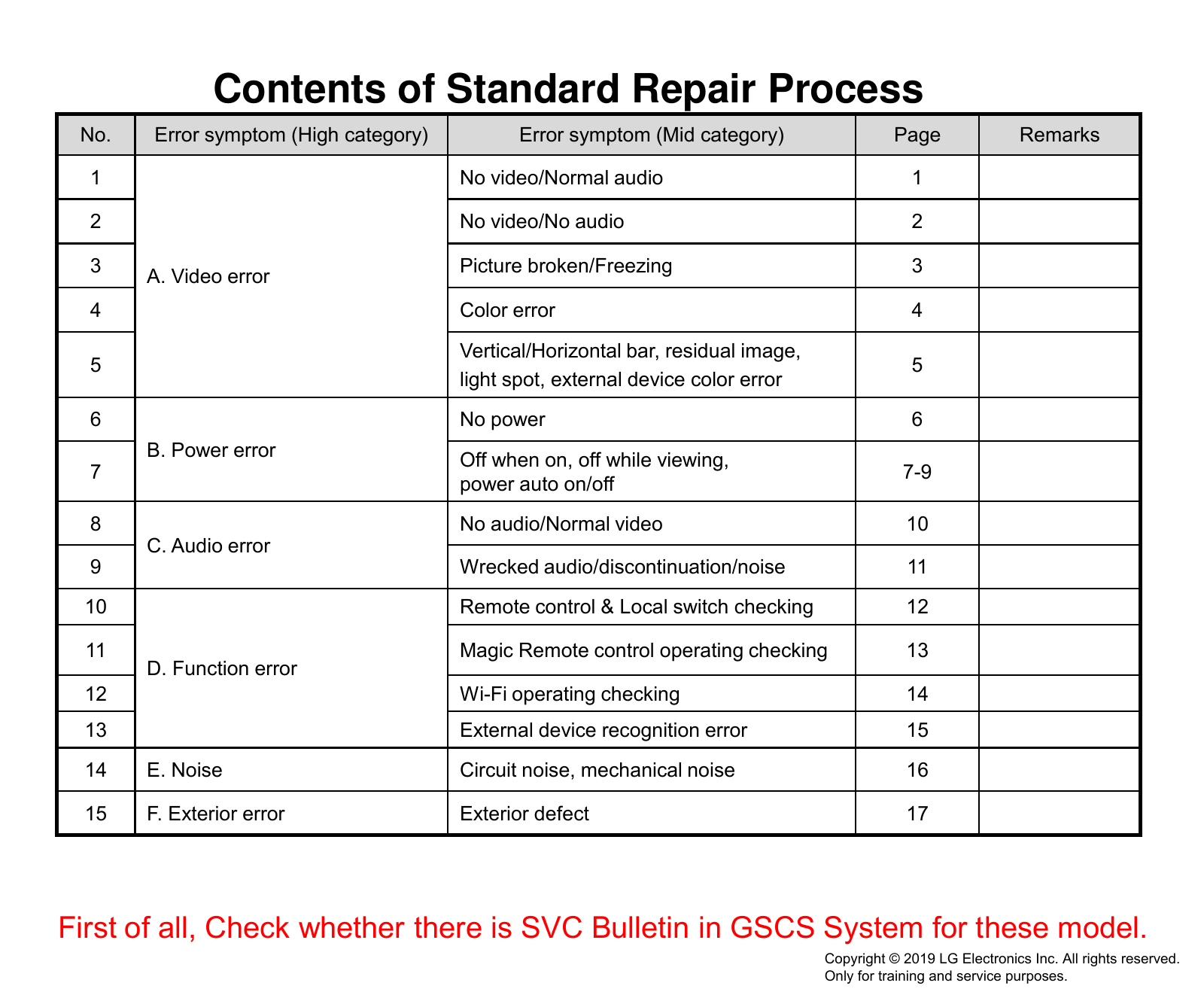
Contents of Standard Repair Process
No. Error symptom (High category) Error symptom (Mid category) Page Remarks
1 No video/Normal audio 1
2 No video/No audio 2
3 Picture broken/Freezing 3
A. Video error
4 Color error 4
Vertical/Horizontal bar, residual image,
5 5
light spot, external device color error
6 No power 6
B. Power error Off when on, off while viewing,
7 7-9
power auto on/off
8 No audio/Normal video 10
C. Audio error
9 Wrecked audio/discontinuation/noise 11
10 Remote control & Local switch checking 12
11 Magic Remote control operating checking 13
D. Function error
12 Wi-Fi operating checking 14
13 External device recognition error 15
14 E. Noise Circuit noise, mechanical noise 16
15 F. Exterior error Exterior defect 17
First of all, Check whether there is SVC Bulletin in GSCS System for these model.
Copyright © 2019 LG Electronics Inc. All rights reserved.
Only for training and service purposes.
Standard Repair Process
Established
Error A. Video error date
symptom
No video / Normal audio Revised date 1/17
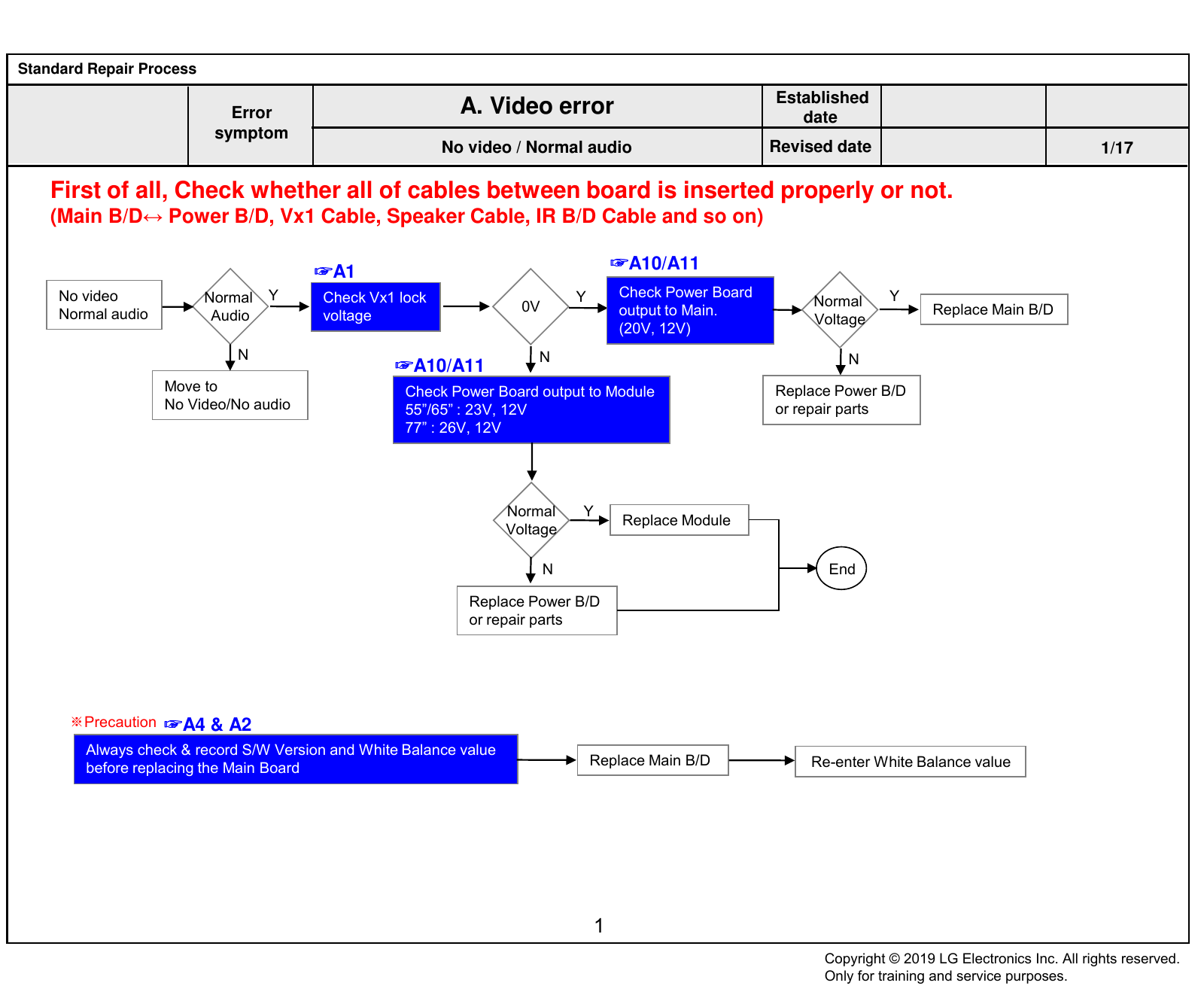
First of all, Check whether all of cables between board is inserted properly or not.
(Main B/D↔ Power B/D, Vx1 Cable, Speaker Cable, IR B/D Cable and so on)
☞A1 ☞A10/A11
No video Normal Y Check Vx1 lock Y Check Power Board Y
0V Normal
Normal audio Audio voltage output to Main. Replace Main B/D
Voltage
(20V, 12V)
N N N
☞A10/A11
Move to Check Power Board output to Module Replace Power B/D
No Video/No audio 55”/65” : 23V, 12V or repair parts
77” : 26V, 12V
Normal Y
Replace Module
Voltage
N End
Replace Power B/D
or repair parts
※Precaution ☞A4 & A2
Always check & record S/W Version and White Balance value
Replace Main B/D Re-enter White Balance value
before replacing the Main Board
1
Copyright © 2019 LG Electronics Inc. All rights reserved.
Only for training and service purposes.
Standard Repair Process
Established
Error A. Video error date
symptom
No video / No audio Revised date 2/17
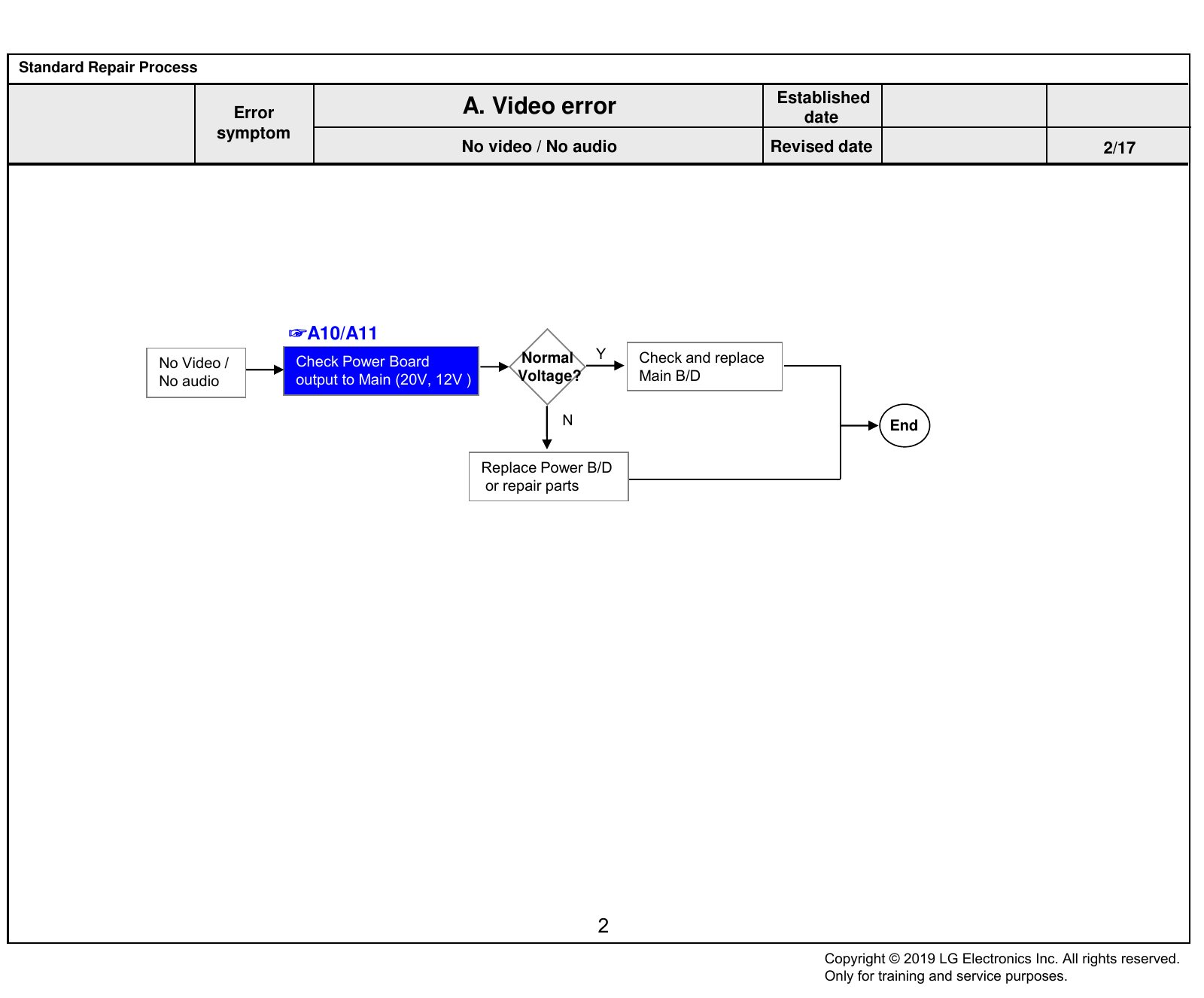
☞A10/A11
No Video / Check Power Board Normal Y Check and replace
No audio output to Main (20V, 12V ) Voltage? Main B/D
N End
Replace Power B/D
or repair parts
2
Copyright © 2019 LG Electronics Inc. All rights reserved.
Only for training and service purposes.
Standard Repair Process
Established
Error A. Video error date
symptom
Picture broken / Freezing Revised date 3/17
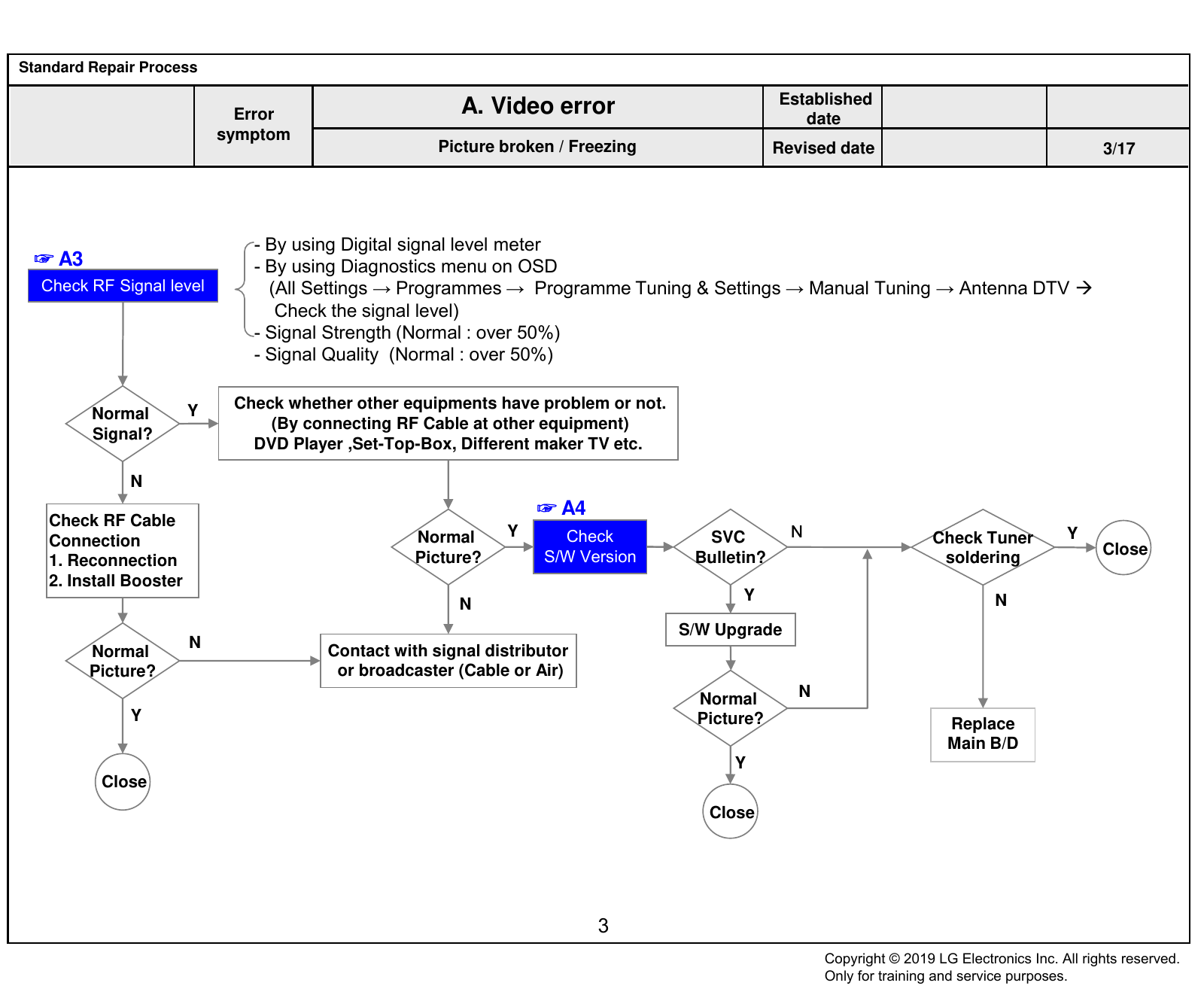
- By using Digital signal level meter
☞ A3 - By using Diagnostics menu on OSD
Check RF Signal level (All Settings → Programmes → Programme Tuning & Settings → Manual Tuning → Antenna DTV
Check the signal level)
- Signal Strength (Normal : over 50%)
- Signal Quality (Normal : over 50%)
Y Check whether other equipments have problem or not.
Normal
(By connecting RF Cable at other equipment)
Signal?
DVD Player ,Set-Top-Box, Different maker TV etc.
N
☞ A4
Check RF Cable
Normal Y Check SVC N Check Tuner Y
Connection Close
1. Reconnection Picture? S/W Version Bulletin? soldering
2. Install Booster
Y N
N
S/W Upgrade
N Contact with signal distributor
Normal
Picture? or broadcaster (Cable or Air)
Normal N
Y Picture? Replace
Main B/D
Y
Close
Close
3
Copyright © 2019 LG Electronics Inc. All rights reserved.
Only for training and service purposes.
Standard Repair Process
Established
Error A. Video error date
symptom
Color error Revised date 4/17
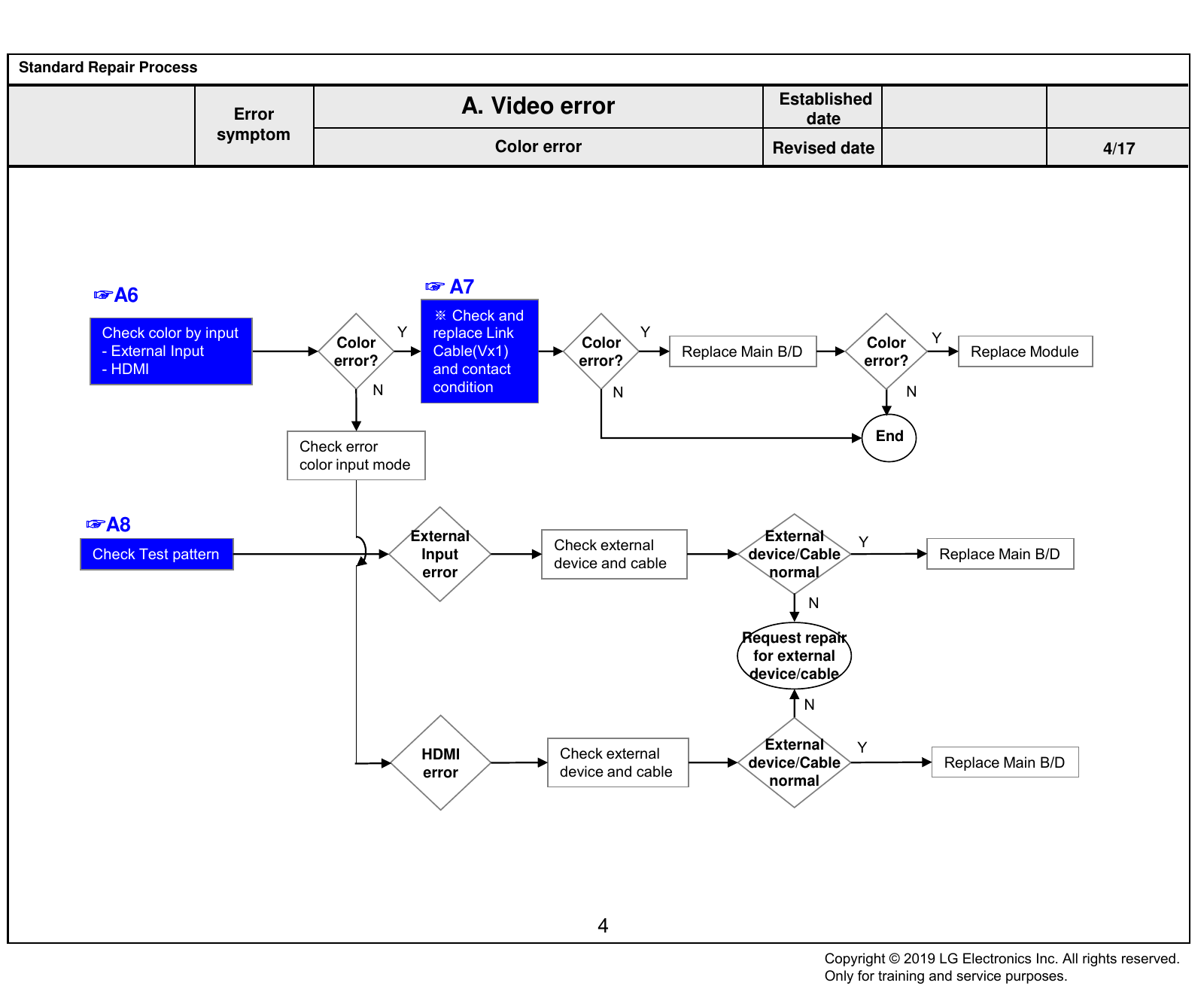
☞A6 ☞ A7
※ Check and
Check color by input Y replace Link Y Y
Color Color Color
- External Input Cable(Vx1) Replace Main B/D Replace Module
error? error? error?
- HDMI and contact
N condition N N
End
Check error
color input mode
☞A8
External External Y
Check external
Check Test pattern Input device/Cable Replace Main B/D
device and cable
error normal
N
Request repair
for external
device/cable
N
HDMI Check external
External Y
device/Cable Replace Main B/D
error device and cable
normal
4
Copyright © 2019 LG Electronics Inc. All rights reserved.
Only for training and service purposes.
Standard Repair Process
Established
Error A. Video error date
symptom Vertical/Horizontal bar, Residual image,
Light spot, External device color error Revised date 5/17
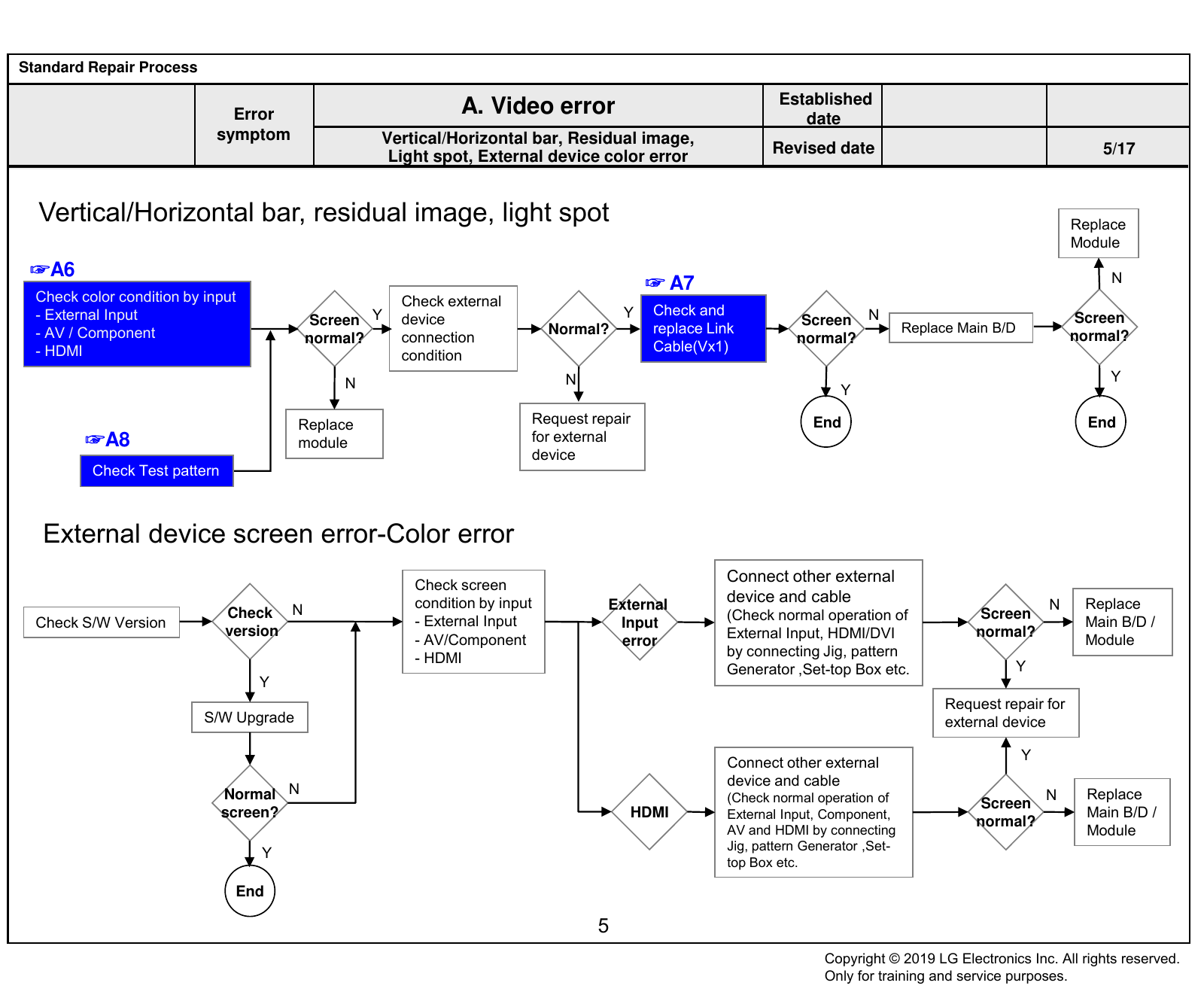
Vertical/Horizontal bar, residual image, light spot Replace
Module
☞A6 N
☞ A7
Check color condition by input Check external
Y Check and
- External Input Screen Y device Screen N Screen
- AV / Component Normal? replace Link Replace Main B/D
normal? connection normal? normal?
- HDMI Cable(Vx1)
condition
N N Y
Y
Replace Request repair End End
☞A8 module for external
device
Check Test pattern
External device screen error-Color error
Connect other external
Check screen
condition by input External device and cable N Replace
Check N (Check normal operation of Screen
Check S/W Version - External Input Input Main B/D /
version
- AV/Component error External Input, HDMI/DVI normal?
Module
- HDMI by connecting Jig, pattern
Generator ,Set-top Box etc. Y
Y
Request repair for
S/W Upgrade external device
Y
Connect other external
device and cable
Normal N (Check normal operation of N Replace
Screen
screen? HDMI External Input, Component, Main B/D /
normal?
AV and HDMI by connecting Module
Jig, pattern Generator ,Set-
Y
top Box etc.
End
5
Copyright © 2019 LG Electronics Inc. All rights reserved.
Only for training and service purposes.
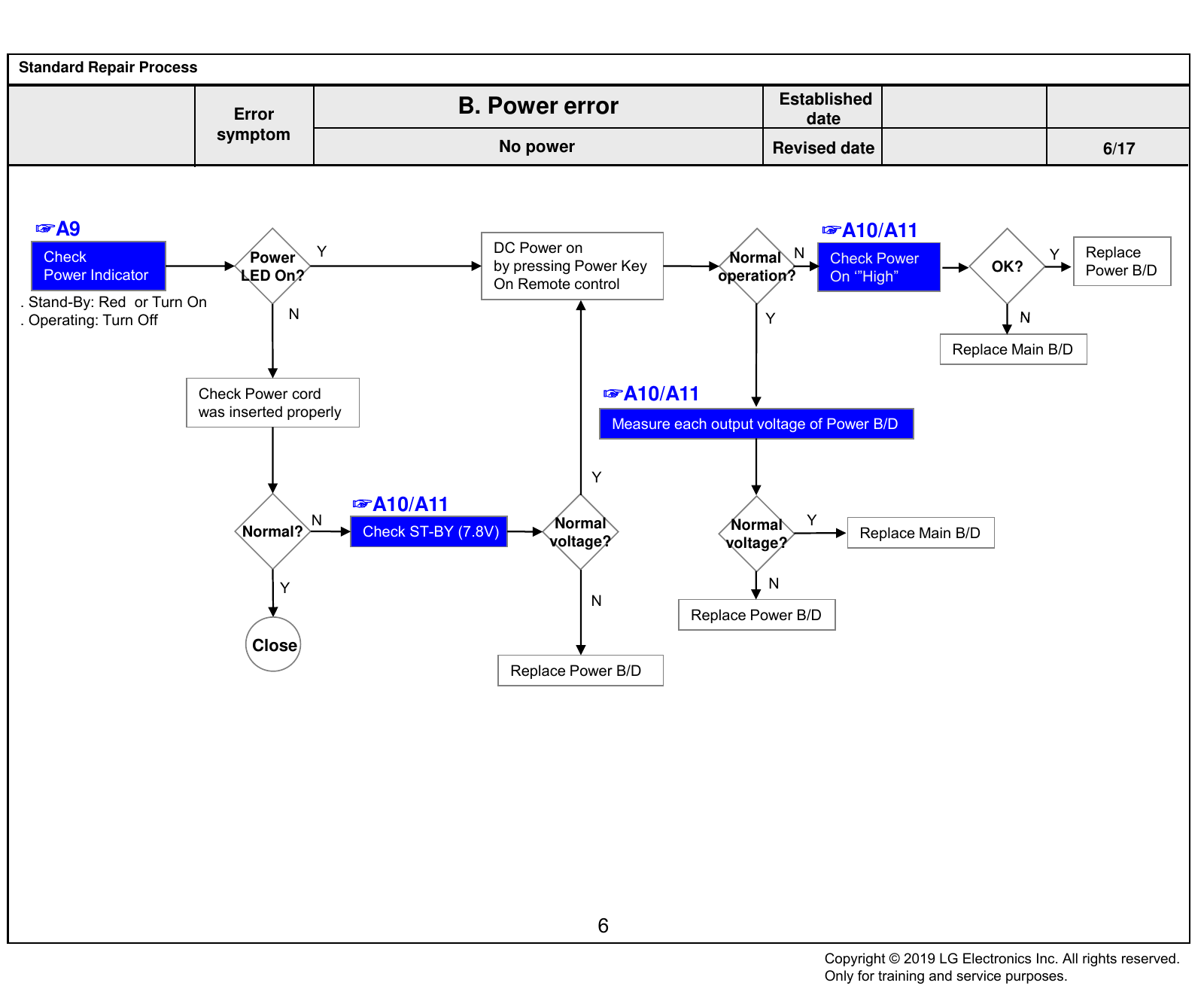
Standard Repair Process
Established
Error B. Power error date
symptom
No power Revised date 6/17
☞A9 ☞A10/A11
Y DC Power on Replace
Check Power Normal N Check Power Y
by pressing Power Key OK? Power B/D
Power Indicator LED On? operation? On ‘”High”
On Remote control
. Stand-By: Red or Turn On
. Operating: Turn Off N Y
Replace Main B/D
Check Power cord ☞A10/A11
was inserted properly
Measure each output voltage of Power B/D
Y
☞A10/A11
N Normal Normal Y
Normal? Check ST-BY (7.8V) Replace Main B/D
Y
voltage? voltage?
Y N
N
Replace Power B/D
Close
Replace Power B/D
6
Copyright © 2019 LG Electronics Inc. All rights reserved.
Only for training and service purposes.
Standard Repair Process
Established
Error B. Power error date
symptom
Off when on, off while viewing, power auto on/off Revised date 7/17
Check outlet
☞A12
N Check Power Off CPU Y
Check Power cord Error? Replace Main B/D Normal? End
Mode Abnormal
N
Check for all 2- phase
power out Y Abnormal
Replace Power B/D
1
Fix Power cord & Outlet ☞A10/A11
and check each 2 phase out (If Power Off mode is
not displayed) Normal Y
Check Power B/D Replace Main B/D
voltage?
output voltage
N
※ Caution
Check and fix exterior Replace Power B/D
of Power B/D Part
7
Copyright © 2019 LG Electronics Inc. All rights reserved.
Only for training and service purposes.
Standard Repair Process
Established
Error B. Power error date
symptom
Off when on, off while viewing, power auto on/off Revised date 8/17
* Please refer to the all cases which can be displayed on power off mode.
Power Off History Explanation Action contents
Power off by CPU Abnormal status
1. Power off (Last Cold, Last Cool, Last Warm)
Condition : When power on and checking Power on Mode, abnormality appears.
POWER_OFF_BY_CPU_ABNORMAL Check & Change Main B/D
2. Power off in CPU Abnormal Case (Exception)
- Release Mode : Reboot
- Debug/Event Mode : Power off
POWER_OFF_BY_CPUCMD Power off by main SoC command. Check & Change Main B/D
Case1 : Pipe line overflow
POWER_OFF_BY_ABN Check & Change Main B/D
Case2 : reboot to suspend Fail
Power off when TV is not turned off during a certain time
Result : micom force to trigger TV power off.
POWER_OFF_BY_KEYTIMEOUT Check & Change Main B/D
Condition : When pressing power key while power on/off status, CPU does not
response within 8 seconds or call the WDT timer API.
Power off by not detecting AC (abnormal case) Normal Case
POWER_OFF_BY_ACDET Result : micom triggers TV power off
Condition : Power detect port drops to low while power on status. Check & Change Main B/D
Power off by not unstable AC power detect.
Result : micom check the stable power.
POWER_OFF_BY_5VMNT Check & Change Main B/D
Condition : When AC on or DC on, stabilization check routine (Power Detect High
Check) fail after multi power on.
Power off when receiving no ack
Debug Status : Release Mode
POWER_OFF_BY_NO_POLLING Result : TV power off/on (Reboot) Check & Change Main B/D
Condition : There is no I2C response from CPU for 15 seconds.
if warm standby, power off occurs.
similar with POWER_OFF_BY_KEYTIMEOUT, but different concept.
Result : micom force to trigger TV power off within 4 seconds.
POWER_OFF_BY_REMOTE_KEY2 Check & Change Main B/D
Condition : When TV power on/off, CPU does not response within 4 seconds,
and then pressing power key.
Check & Change OLED
POWER_OFF_BY_INV_ERROR Power off by OLED module error
Module
Result : Reboot Check & Change OLED
POWER_OFF_BY_ONRF_FAIL
Condition : OLED module compensation is running but fails. Module
Check & Change OLED
POWER_OFF_BY_PNWASHFAIL Power off by panel noise wash function fail case. (OLED)
Module
Power off by resume fail when dc on case.
POWER_OFF_BY_RESUME_FAIL Check & Change Main B/D
If occur the resume fail, TV will be rebooted.
8
Copyright © 2019 LG Electronics Inc. All rights reserved.
Only for training and service purposes.
Standard Repair Process
Established
Error B. Power error date
symptom
Off when on, off while viewing, power auto on/off Revised date 9/17
* Please refer to the all cases which can be displayed on power off mode.
Power Off list Explanation Action contents
Power off by Micom Reset
POWER_OFF_BY_RESET It's not recommend. Please use POWER_OFF_BY_REQUEST_RESET.
RESULT : Reset the TV and init time data.
POWER_ON_BY_REMOTE_KEY Power on by remote Power Key.
POWER_OFF_BY_OFF_TIMER Power off by Off timer
POWER_OFF_BY_SLEEP_TIMER Power off by sleep timer
POWER_OFF_BY_INSTOP_KEY Power off by Instop Key
Power off by auto off function
POWER_OFF_BY_AUTO_OFF 1. When it lasts for 15 minutes that no signal and no remote key input.
2. When screen mute status lasts for 2 hours.
Power off by On timer
POWER_OFF_BY_ON_TIMER
Power off when no remote and local key input for 2 hours after power on by On timer.
POWER_OFF_BY_RS232C Power off by RS232C command
Power off by reserved recording Normal Case
POWER_OFF_BY_RESREC Power off automatically after recording finishes after TV turns on by reservation
recording from power off status.
POWER_OFF_BY_SWDOWN Power off by software download
POWER_OFF_BY_LOCAL_KEY Power off by local key
Result : Power off
POWER_OFF_BY_COMP_END
Condition : OLED threshold voltage degradation completes.
POWER_OFF_BY_HDMI_CEC Power off by HDMI CEC command
POWER_OFF_BY_PNWASHSTART Power off for starting OLED panel noise function in warm state.
POWER_OFF_BY_PNWASHDONE Power off by panel noise wash function completed.
POWER_OFF_BY_COOLING Power off for cool down the OLED t-con.
POWER_OFF_BY_EDID_WRITE Power off by EDID write done.
9
Copyright © 2019 LG Electronics Inc. All rights reserved.
Only for training and service purposes.
Standard Repair Process
Established
Error C. Audio error date
symptom
No audio / Normal video Revised date 10/17
☞A13 ☞A14 & A10/A11
Check Sound menu Y Check Y
No audio Internal TV Normal
→ Internal TV speaker audio B+ voltage(20V)
Screen normal Speaker voltage
or not of Power Board
N N
Replace Power Board or repair parts
Select Internal TV Speaker
Check Speaker N
Disconnection Replace Main B/D End
cable connection
Y
Connect Speaker cable
10
Copyright © 2019 LG Electronics Inc. All rights reserved.
Only for training and service purposes.
Standard Repair Process
Established
Error C. Audio error date
symptom
Wrecked audio / Discontinuation / Noise Revised date 11/17
→ Abnormal audio/discontinuation/noise is same after “Check input signal” compared to No audio
Wrecked audio/
☞A14 & A10/A11
Check and replace
Discontinuation/ Check audio
speaker and cable
Noise for B+ Voltage (20V)
all audio
Check input signal
- RF Signal Y
- External Input normal? Wrecked audio/ Y
signal Normal
Discontinuation/
N Replace Main B/D voltage?
Noise only
for D-TV
N
Wrecked audio/
Discontinuation/
Replace Power B/D
Noise only for
Analog
(When RF signal is not
received)
Request repair to external Wrecked audio/ Replace Main B/D End
cable/ANT provider Discontinuation/
Noise only for
External Input
(In case of External Input
signal error) Connect and check N
other external Normal
Check and fix external audio?
device device
Y
Check and fix external device
11
Copyright © 2019 LG Electronics Inc. All rights reserved.
Only for training and service purposes.
Standard Repair Process
Established
Error D. Function error date
symptom
Remote control & Local switch checking Revised date 12/17
1. Remote control(R/C) operating error Replace
Main B/D
☞A15 ☞A15 ☞A15
Check & Repair N Check Y Y
Check R/C itself Normal Y Normal Normal Check IR Normal
operating? Cable connection operating? B+ 3.5V Voltage? Signal?
Operation Output signal
Connector solder on Main B/D
N Y N N
☞A10/A11
Check R/C Operating Check & Replace Check 7.8V on Power B/D Repair/Replace
Close
When turn off light Baterry of R/C Replace Power B/D or IR B/D
in room Replace Main B/D
(Power B/D don’t have problem)
If R/C operate, Normal Y
Close
Explain the customer operating?
cause is interference
from light in room. N
Replace R/C
12
Copyright © 2019 LG Electronics Inc. All rights reserved.
Only for training and service purposes.
Standard Repair Process
Established
Error D. Function error date
symptom
Magic Remote control operating checking Revised date 13/17
2. Magic Remote control operating error
☞A4
Check Magic Turn off/on the
Check the RF Receiver ver N Normal Y Press the Is show ok N
is “00.00”? remote control operating? message? set and press
Instart menu wheel
itself Operation the wheel
N Y
Y
☞A16 Check & Replace Battery
Check & Repair Close
of Magic remote control
RF assy
connection
Normal Y
Close
☞A4 operating?
Is show ok N Press the back
RF Receiver ver N message? key about 5sec
Close N
is “00.00”?
Y
Replace
Magic remote
Y control Close
Download the Firmware
•If you conduct the loop at 3times,
Instart Memu
change Magic remote control
12.RF Remote control Test
Receiver Firmware Download
13
Copyright © 2019 LG Electronics Inc. All rights reserved.
Only for training and service purposes.
Standard Repair Process
Established
Error D. Function error date
symptom
Wi-Fi operating checking Revised date 14/17
3.Wi-Fi operating error
☞A4
☞A16
Check the Wi-Fi MAC N Check the Wi-Fi wafer Normal N Replace
Instart menu is “NG”? 19/24 pin Voltage? Main B/D
Y
Y
☞A16
Close
Check & Repair
Wi-Fi cable
connection
☞A4
N
Wi-Fi MAC
is “NG”? Close
Y
Replace the Wi-Fi assy
14
Copyright © 2019 LG Electronics Inc. All rights reserved.
Only for training and service purposes.
Standard Repair Process
Established
Error D. Function error date
symptom
External device recognition error Revised date 15/17
Check technical
Y
Check Signal information Technical N External Input
Replace Main B/D
input signal input? - Fix information information? Recognition error
- S/W Version
N Y
HDMI/DVI,
Check and fix Optical Recognition Replace Main B/D
Fix in
external device/cable error
accordance
with technical
information
15
Copyright © 2019 LG Electronics Inc. All rights reserved.
Only for training and service purposes.
Standard Repair Process
Established
Error E. Noise date
symptom
Circuit noise, Mechanical noise Revised date 16/17
Identify Circuit Check location
Replace Power B/D
noise type noise of noise
Mechanical Check location
noise of noise
※ When the nose is severe, replace the module
(For models with fix information, upgrade the
※ Mechanical noise is a natural
S/W or provide the description)
phenomenon, and apply the 1st level
OR
description. When the customer does not
agree, apply the process by stage. ※ If there is a “Tak Tak” noise from the
※ Describe the basis of the description cabinet, refer to the KMS fix information and
in “Part related to nose” in the Owner’s then proceed as shown in the solution manual
Manual. (For models without any fix information,
provide the description)
16
Copyright © 2019 LG Electronics Inc. All rights reserved.
Only for training and service purposes.
Standard Repair Process
Established
Error F. Exterior defect date
symptom
Exterior defect Revised date 17/17
Zoom part with Module
Replace module
exterior damage damage
Cabinet
Replace cabinet
damage
Remote
control Replace remote control
damage
Stand
Replace stand
dent
17
Copyright © 2019 LG Electronics Inc. All rights reserved.
Only for training and service purposes.
Contents of Standard Repair Process Detail Technical Manual
No. Error symptom Content Page Remarks
1 Check Vx1 lock A1
A. Video error_ No video/Normal audio
2 Check White Balance value A2
3 Tuner input signal strength checking method A3
4 A. Video error_ video error /Video Version checking method A4
lag/stop
5 Tuner Checking Part A5
A. Video error_Vertical/Horizontal bar,
6 Connection diagram A6
residual image, light spot
Check Link Cable(Vx1) reconnection
7 A7
condition
A. Video error_ Color error
8 Adjustment Test pattern - ADJ Key A8
Example of Symptom (Image error) A-1/10
Example of Symptom (Image error) A-2/10
Example of Symptom (Main) A-3/10
Example of Symptom (Main) A-4/10
Example of Symptom (Main) A-5/10
9 Defected Type caused by Cable / Main
Board / Module Example of Symptom (Module) A-6/10
Example of Symptom (Module) A-7/10
Example of Symptom (Module) A-8/10
Example of Symptom (Module) A-9/10
Example of Symptom (Power board) A-10/10
Continue to the next page
Copyright © 2019 LG Electronics Inc. All rights reserved.
Only for training and service purposes.
Contents of Standard Repair Process Detail Technical Manual
Continued from previous page
No. Error symptom Content Page Remarks
10 Check Power Indicator A9
B. Power error_ No power A10
11 Check power input Voltage & ST-BY 3.5V
A11
B. Power error_Off when on, off
12 POWER OFF MODE checking method A12
while viewing
13 Checking method in menu when there is no audio A13
C. Audio error_ No audio/Normal
video Voltage and speaker checking method when there
14 A14
is no audio
15 Remote control operation checking method A15
D. Function error
16 Wi-Fi/Motion Remote operation checking method A16
17 How to use the Service remote control A17-A19
18 E. Etc Check items after Main B/D replacement A20
How to use JIG
19 A21
(Power B/D Diagnostic Smart Jig Multi Gender)
Copyright © 2019 LG Electronics Inc. All rights reserved.
Only for training and service purposes.
Standard Repair Process Detail Technical Manual
Error Established
symptom A. Video error_No video/Normal audio date
Revised
Content Check Vx1 lock /Check BDP Point A1
date
R7624 : 0[V]
Check a voltage of R7624 after turn on the TV. Check a voltage of R7632 after turn on the TV.
If the voltage is low, Vx1 is locked.(OK) If the voltage is high, BDP issue.(NG)
A1
Copyright © 2019 LG Electronics Inc. All rights reserved.
Only for training and service purposes.
Standard Repair Process Detail Technical Manual
Error Established
symptom A. Video error_No video/Normal audio date
Revised
Content Check White Balance value date A2
1. Press ‘ADJ’ button on Factory Service Remote control.
2. Enter into ‘12.White Balance’
3. After recording the R, G, B (Gain, Cut) value of each Color Temp(Cool/Medium/Warm),
re-enter the value after replacing Main board.
A2
Copyright © 2019 LG Electronics Inc. All rights reserved.
Only for training and service purposes.
Standard Repair Process Detail Technical Manual
Error Established
symptom A. Video error_Video error, video lag/stop date
Revised
Content Tuner input signal strength checking method date A3
1. Press ‘MENU’ button on Factory Service remote control.
2. Enter into Manual Tuning menu as below.
All Settings Programmes Programme Tuning & Settings
Manual Tuning
3. Check the signal level.
When the signal is strong,
use the attenuator
(-10dB, -15dB, -20dB etc.)
A3
Copyright © 2019 LG Electronics Inc. All rights reserved.
Only for training and service purposes.
Standard Repair Process Detail Technical Manual
Error Established
symptom A. Video error_Video error, video lag/stop date
Revised
Content Version checking method date A4
Version
1. Press ‘IN START’ button on Factory Service remote control.
2. Check S/W Version
A4
Copyright © 2019 LG Electronics Inc. All rights reserved.
Only for training and service purposes.
Standard Repair Process Detail Technical Manual
Error Established
symptom
A. Video error_Video error, video lag/stop
date
Revised
Content Tuner checking part date A5
Checking method:
1. Check the signal strength or check whether the screen is normal when the external device is connected.
2. After measuring each voltage from power supply, finally replace the Main board.
A5
Copyright © 2019 LG Electronics Inc. All rights reserved.
Only for training and service purposes.
Standard Repair Process Detail Technical Manual
Error A. Video error _Vertical/Horizontal bar, Established
symptom Residual image, Light spot date
Revised
Content Connection diagram date A6
As the part connecting to the external input, check the
screen condition by signal
A6
Copyright © 2019 LG Electronics Inc. All rights reserved.
Only for training and service purposes.
Standard Repair Process Detail Technical Manual
Error Established
symptom A. Video error_Color error date
Revised
Content Check Link Cable(Vx1) reconnection condition date A7
Check the contact condition of the Link Cable, especially dust or mis-insertion.
A7
Copyright © 2019 LG Electronics Inc. All rights reserved.
Only for training and service purposes.
Appendix. Examples of Symptoms(Image error) Check for poor cable contact
Symptom
Item Cause Symptom Image
Name
Cable Color smear Poor broken pin of FFC cable
R Color Color is Excessive due to FFC Cable
Cable
Excessive Contact.
screen is dark due to poor contact due
Cable Screen darkness to disconnection of the FFC cable pin.
G Color G color transient due to poor FFC cable
Cable connection
Excessive
A - 1/10
Copyright © 2019 LG Electronics Inc. All rights reserved.
Only for training and service purposes.
Appendix. Examples of Symptoms(Image error) Check for poor cable contact
Symptom
Item Cause Symptom Image
Name
Cable Color spread Vx1 cable connection problem
Due to foreign substance withi nLVDS
Cable Screen stop cable PIN
A - 2/10
Copyright © 2019 LG Electronics Inc. All rights reserved.
Only for training and service purposes.
Appendix. Examples of Symptoms(Main) Check parts by symptom
Symptom
Item Cause Symptom Image
Name
Main Screen noise Bit noise from horizontal screen
Broken screen due to
Main Screen noise
Main IC problem
Main Dark picture Dark left-side screen
Top/bottom screen part
Main Broken picture
Picture problem due to tuner
Inner side quality problem
A - 3/10
Copyright © 2019 LG Electronics Inc. All rights reserved.
Only for training and service purposes.
Appendix. Examples of Symptoms(Main) Check parts by symptom
Symptom
Item Cause Symptom Image
Name
Main Broken screen Broken screen in a horizontal manner
Main Screen spread Screen corner appears blurry
Main Color Spread Color spread on the screen
Main Blurry Screen Blurry picture on the screen
A - 4/10
Copyright © 2019 LG Electronics Inc. All rights reserved.
Only for training and service purposes.
Appendix. Examples of Symptoms(Main) Check parts by symptom
Symptom
Item Cause Symptom Image
Name
No problem at the initial stage,
Main Broken picture G-color spread after 10 minutes
Right-side
Main
Screen Right-side screen problem
problem
LG logo
Main Screen picture spread problem
Screen problem
No problem at the initial stage.
Right-side
Main During Heat run, right-side picture
picture problem
problem
A - 5/10
Copyright © 2019 LG Electronics Inc. All rights reserved.
Only for training and service purposes.
Appendix. Examples of Symptoms(Module) Check parts by symptom
Symptom
Item Cause Symptom Image
Name
Un-repairable Cases
Module Vertical bar
In this case please exchange the module
Module image broken Source Driver issue
Module White dot White dot cause by panel issue
Module Line Dim Vertical Line cause by source drive IC
A - 6/10
Copyright © 2019 LG Electronics Inc. All rights reserved.
Only for training and service purposes.
Appendix. Examples of Symptoms(Module) Check parts by symptom
Symptom
Item Cause Symptom Image
Name
Module Burnt Module burnt
Module Horizon line Module has damaged
Module has damaged
Module Line Defect
Un-repairable Cases
Module Press damage
In this case please exchange the module
A - 7/10
Copyright © 2019 LG Electronics Inc. All rights reserved.
Only for training and service purposes.
Appendix. Examples of Symptoms(Module) Check parts by symptom
Symptom
Item Cause Symptom Image
Name
Module Vertical bar Vertical Bar cause by source drive IC
Vertical Noise Un-repairable Cases
Module Brightness
In this case please exchange the module
difference
Module Green light Compensation error when Power On/off
Color difference between screen cause
Module Color difference by compensation error
A - 8/10
Copyright © 2019 LG Electronics Inc. All rights reserved.
Only for training and service purposes.
Appendix. Examples of Symptoms(Module) Check parts by symptom
Symptom
Item Cause Symptom Image
Name
Module has damaged
Module No image
(Can’t fix it)
Burnt
Module Burnt
(Can’t fix it)
Screen Mura
Module Mura
(Can’t fix it)
A - 9/10
Copyright © 2019 LG Electronics Inc. All rights reserved.
Only for training and service purposes.
Appendix : Exchange Power Board (PSU)
No Light No picture/Sound Ok
A - 10/10
Copyright © 2019 LG Electronics Inc. All rights reserved.
Only for training and service purposes.
Standard Repair Process Detail Technical Manual
Error Established
symptom B. Power error _No power date
Revised
Content Check Power Indicator date A9
Stand-by condition : Red
Power On condition : Turn Off
※ Power indicator control
Menu All Settings General Standby Light ON/ Off
A9
Copyright © 2019 LG Electronics Inc. All rights reserved.
Only for training and service purposes.
Standard Repair Process Detail Technical Manual
Error Established
symptom B. Power error _No power date
Revised
Content Check power input voltage and ST-BY 3.5V date A10
Check 12VM line for ST-BY Voltage Power To Main B’d
ST-BY status : 7.8V, Power on(DC On) status : 12V
P201
P251
Power To Module
A10
Copyright © 2019 LG Electronics Inc. All rights reserved.
Only for training and service purposes.
Standard Repair Process Detail Technical Manual
Error
symptom B. Power error_Off when on, off whiling viewing Established
date
Revised
Content POWER OFF MODE checking method date A12
1. Press ‘IN START’ button on Factory Service remote control
2. Check the entry into ‘3. Power On/Off Status’.
A12
Copyright © 2019 LG Electronics Inc. All rights reserved.
Only for training and service purposes.
Standard Repair Process Detail Technical Manual
Error Established
symptom C. Audio error_No audio/Normal video
date
Revised
Content Checking method in menu when there is no audio date A13
1. Press ‘MENU’ button.
2. Select ‘All Settings’
3. Select ‘Sound’ menu and ‘Sound Out’.
4. Select Internal TV Speaker.
A13
Copyright © 2019 LG Electronics Inc. All rights reserved.
Only for training and service purposes.
Standard Repair Process Detail Technical Manual
Error Established
symptom C. Audio error_No audio/Normal video date
Voltage and speaker checking method Revised
Content date A14
when there is no audio
P201
② ①
1 SPK_R-_FT 2 SPK_R+_FT
3 SPK_L-_FT 4 SPK_L+_FT
5 SPK_R-_CT 6 SPK_R+_CT
7 SPK_L-_CT 8 SPK_L+_CT
Checking order when there is no audio
1.Check the contact condition of or 13.2V connector of Main Board.
2. Measure 20V input voltage for Audio AMP supplied from Power board.
(If there is no input voltage, remove and check the harness)
3. Connect the tester RX1 to the speaker terminal and if you hear the Chik Chik
sound when you touch the GND and output terminal, the speaker is normal.
A14
Copyright © 2019 LG Electronics Inc. All rights reserved.
Only for training and service purposes.
Standard Repair Process Detail Technical Manual
Error Established
symptom D. Function error date
Revised
Content Remote control operation checking method date A15
① IR & EYE Sensor Pin Pin name
1 LED_R
2 GND
3 IR
③ 4 3.5V_ST
5 GND
6 GND
7 EYE_SCL
8 KEY2
9 EYE_SDA
10 KEY1
11 n.c
12 GND
② 13 3.5V_WIFI
14 GND
COMBO_RESET_JA
15
CK
BT_WAKEUP_HOS
16
T
Eye LED IR WOL/WIFI_POWER
17
_ON
18 GND
19 3.5V_WIFI
20 WIFI_DP
WIFI_SUSPEND/RE
21
1. Check IR cable condition between IR & Main board. SUME_JACK
2. Check +3.5V_ST on pin 4(③) 22 WIFI_DM
3. AS checking the Pre-Amp of IR B/D(③) , the power is in ON condition, an Analog Tester 23 GND
needle should move slowly, otherwise, it’s defective. 24 3.5V_WiIFI
25 GND
A15
Copyright © 2019 LG Electronics Inc. All rights reserved.
Only for training and service purposes.
Standard Repair Process Detail Technical Manual
Error Established
symptom D. Function error date
Revised
Content Wi-Fi / Motion Remote operation checking method date A16
① Wifi & BT Front Pin Pin name
1 LED_R
2 GND
3 IR
4 3.5V_ST
5 GND
6 GND
7 EYE_SCL
8 KEY2
9 EYE_SDA
10 KEY1
Wifi & BT Rear 11 n.c
12 GND
13 3.5V_WIFI
14 GND
COMBO_RESET_JA
15
② CK
BT_WAKEUP_HOS
16
T
WOL/WIFI_POWER
17
_ON
18 GND
③ 19 3.5V_WIFI
Checking order 20 WIFI_DP
WIFI_SUSPEND/RE
21
1. Check BT/Wifi cable condition between BT/Wifi assy & Main board. SUME_JACK
2. Check the 3.5V on the terminal 13, 19, 24. 22 WIFI_DM
23 GND
24 3.5V_WiIFI
25 GND
A16
Copyright © 2019 LG Electronics Inc. All rights reserved.
Only for training and service purposes.
Standard Repair Process Detail Technical Manual
Error Established
symptom
E.Etc
date
Revised
Content How to use the Service remote control date A17
1. How to access the remote control
0 4 1 3
0 4 1 3
A17
Copyright © 2019 LG Electronics Inc. All rights reserved.
Only for training and service purposes.
Standard Repair Process Detail Technical Manual
Error Established
symptom
E.Etc
date
Revised
Content How to use the Service remote control date A18
2. Remote control part definition
POWER Power On/Off
[ETC] Each time pressing the KEY button, Mode gets changed to ETC and P-ONLY each time
ETC (Added Function) All KEY function [PIP PR-][PIP PR+][SWAP]
[PIP INPUT][DVI] KEY Function
Changed to factory mode
P-ONLY (Added
Function)
All KEY function &[INFO][STILL][HDMI HOT][USB HOT][HDMI4] KEY Action
INPUT Change to the external device mode
ARC Change in the order of 16:9=>Zoom1=>Zoom2=>Cinema Zoom=>Aucto Screen=>4:3=>16:9
Changes in the order of Bright Picture=>Easy Picture=>Cinema=>Spots=>Game=>
PSM
Custom PIcture1=>Custom Picture2=>Bright Picture
SSM (Added Function) Standard(user)=>music=>cinema=>sports=>game=>standard(user)
PIP Picture In Picture is activated
TEXT Access to the Power Only mode
CAP Broadcasting caption(on/off)
MPX Stereo mode (mono, stereo, foreign language) access
Used when in factory mode
Simplink (Added
Access to the Simplink-connected device
Function)
Digital EYE function ON/OFF
EYE
For some Model, access to the Test Pattern
TILT Used for screen tilting change (Access to the old PDP control mode)
A18
Copyright © 2019 LG Electronics Inc. All rights reserved.
Only for training and service purposes.
Standard Repair Process Detail Technical Manual
Error Established
symptom
E.Etc
date
Revised
Content How to use the Service remote control date A19
B-TOOTH
Connected to Blue-Tooth
(Added function)
Model Nam ex) 42PG60D-NA Current Model Name S/W Version ex)
IN-START V03.11.0 Current S/W version
MICOM Version ex) V3.05.0 current Mi-Com version UTT ex) User TV total usage time
POWER OFF STATUS ex) Shows power-off status
ADJ
Test Pattern (Off=>White=>Red=>Green=>Blue=>Black=>Pattern=>Off) Change
X-STUDIO (Added function) HDD,USB, external device’s HDD screen is activated
MENU User function gets activated
EXIT Exit from the current mode
TIME SHIFT (Added
Moves forward/backward of recorded contents
function)
MUTE Mute function (0 Volume)
IN-STOP SET to factory mode
VOL + - Volume Up/Down
CH + - Channel Up/Down
AV1,2,3 (Added function) Connects to external input 1,2,3
COMP1,2 (Added function) Connects to Component 1,2
HDMI1,2,3,4
Connects to HDMI 1,2,3,4
(Add function)
DVI (Add function) Connects to DVI
A19
Copyright © 2019 LG Electronics Inc. All rights reserved.
Only for training and service purposes.
Standard Repair Process Detail Technical Manual
Error Established
symptom
E.Etc
date
Revised
Content Check items after Main B/D replacement date A20
Check items afer Main B/D(Model Number D/L, White Balance)
1. Press the Service remote control instart Key.
No.7 Select Model Number D/L
- Key in the model name and serial number
after checking the ID label on the back cover.
2. Press the Service remote control ADJ Key.
No.13 Select White Balance
- Record the R, G, B (GAIN, Cut) value of the
color temperature before main board
replacement.
A14 After replacing the main board, key in the
recorded value.
A20
Copyright © 2019 LG Electronics Inc. All rights reserved.
Only for training and service purposes.
Smart JIG Power Diagnosis
Muitl Gender Guide
(P/N : RAD32507801) (P/N : RAD33187801)
A21
Copyright © 2019 LG Electronics Inc. All rights reserved.
Only for training and service purposes.
Power Board Muitl Gender JIG Diagram (P/N: RAD33187801)
15Y 16Y 15Y
(LF/UF Series) (OLED B6) (OLED)
28Pin 24Pin 24Pin 24Pin NC
18 Marking check 24Pin
18Pin 16Y
New JIG (OLED)
24Pin
13Y/14Y 28Pin
No Marking
OLD JIG
17/18Y
/19Y
17Y/18Y/19Y
W7 (OLED)
24Pin 12Y 18Y/19Y
18Y/19Y
LK57,32/43/49LK54
B8, C8
E8, G8 24Pin
UK63/UK64 32LK61/32LK62 W8
UK65/UK68 43/49LK61 B9/C9/
UK7050 LM57/LM63 E9/W9
18Y/19Y UM73/UM74
SK80/UK89 UM75/UM76/
SK85/SK96 UM79/UM80
16Y/17Y/18Y/19Y
SK95/SK99
SM90/SM98 (UH/UJ/UK/SK/
18Pin /SM
18Y/19Y
24 Marking Check 28Pin UK74,UK75
28Pin 12Pin 12Pin 28Pin
UK77,UK78
Cable Connection SK79
Includes 49UJ63 SM80/SM86
17Y/18Y 16/18Y/19Y 16Y/17Y 16Y
16Y/17Y/18Y/19Y (UH)
(SJ/UJ/UK/SK) (UH/UK/UM) (UH/SJ)
(LH/LJ/LK/LM)
Copyright © 2019 LG Electronics Inc. All rights reserved.
Only for training and service purposes.
Power Board Muitl Gender JIG Diagnostic model List
<15Y/16Y/17Y/18Y/19Y OLED Model, 16Y/17Y/18Y/19Y LED Model>
Year Product Model
EG92/EG93/EG94
‘15 OLED EG96
EF95
B6, C6
OLED
E6, G6
‘16 UH95/UH96, UH85/UH93
LED UH77/UH87, UH75/UH76
UH65/UH68, LH68, LH66, LH60,LH54
‘17 OLED B7, C7, E7, G7, W7
SJ95/UJ98, SJ85/UJ94
SJ80, UJ77, UJ75/UJ78
’17 LED
UJ65/UJ68, UJ63/UJ67
LJ61/LJ68, LJ55/LJ58
SK80/SK85/SK95
UK78/UK75/UK77/SK79
‘18 LED
UK63/UK64/UK65/UK68/UK7050
LK57, 32/43/49LK54, 32LK61/62, 43/49LK61
‘18 OLED B8, C8, E8, G8, W8
SM80/SM85/SM86
‘19 LED UM73/UM74/UM75/UM76/UM79/UM80
LM57/LM63
‘19 OLED B9/C9/E9/W9
Copyright © 2019 LG Electronics Inc. All rights reserved.
Only for training and service purposes.
Power Board Muitl Gender How to Connect
1
▶ Power Board Muitl Gender JIG
2
“A: 2013 LCD POWER”
2014
▶ Connect the Muiti Gender to the connector (black)
as shown in picture 2 of the Smart JIG.
Copyright © 2019 LG Electronics Inc. All rights reserved.
Only for training and service purposes.
Smart Jig Voltage Setting
1 2
▶ Switch the product S/W in JIG to LCD.
▶ LCD MODEL Check the power voltage
▶ Check power board voltage. and switch to the correct voltage.
※ Note on set up
(The correct power diagnosis can be made only if it is set correctly.)
- 24V Power Board : Change the switch to 24V of Smart Jig Voltage
- 20V Power Board : Change the switch to 24V of Smart Jig Voltage
- 13.2V/18V Power Board : Change the switch to 24V of Smart Jig Voltage
Power B/D Smart Jig Voltage Switch
24V 24V
20V 20V
13.2V/18V 24V
Copyright © 2019 LG Electronics Inc. All rights reserved.
Only for training and service purposes.
`15Y OLED(EG96,EF95,EG92,EG93,EG94) Power Board Diagnostic method (1)
1 2
▶ Switch the product S/W in JIG to LCD.
▶ LCD MODEL Check the power voltage
and switch(24V) to the correct voltage.
▶ Check power board voltage. ▶ Fix the LCD MODEL switch to 24V.(Smart JIG)
3 4
▶ Disconnect the Main Board 24Pin Power Cable connector. ▶ Connect the 24Pin Power Cable connector to the Muitl
Gender JIG 24Pin connector
Copyright © 2019 LG Electronics Inc. All rights reserved.
Only for training and service purposes.
`15Y OLED(EG96,EF95,EG92,EG93,EG94) Power Board Diagnostic method (2)
5 6
▶ When the OK LED(24V,12V) turns on, Power Board is normal.
▶ When the NG LED turns on, the Power Board
can be judged as defective.
Copyright © 2019 LG Electronics Inc. All rights reserved.
Only for training and service purposes.
`16Y OLED(B6) Power Board Diagnostic method
1 2
▶ Switch the LCD MODEL S/W to 24V by checking
the power voltage.
▶ Fix the LCD MODEL switch to 24V.(Smart JIG)
▶ Connect the 24Pin Power Cable connector
to the Multi gender JIG 24Pin connector.
3
▶ When the OK LED(24V,12V) turns on, Power Board is normal.
▶ When the NG LED turns on, the Power Board
can be judged as defective.
Copyright © 2019 LG Electronics Inc. All rights reserved.
Only for training and service purposes.
`16Y OLED(C6) Power Board Diagnostic method
1 2
▶ Check power board voltage. ▶ Disconnect the Main Board 24Pin Power Cable connector.
▶ Smart JIG: Fix the LCD MODEL switch to 24V.(Smart JIG)
3 4
▶ Connect the 24Pin Power Cable connector ▶ When the OK LED(24V,12V) turns on, Power Board is normal.
to the Muitl Gender JIG 24Pin connector
Copyright © 2019 LG Electronics Inc. All rights reserved.
Only for training and service purposes.
`16Y OLED(E6) Power Board Diagnostic method
1 2
▶ Check power board voltage. ▶ Disconnect the Main Board 24Pin Power Cable connector.
▶ Fix the LCD MODEL switch to 24V.(Smart JIG)
3 4
▶ Connect the 24Pin Power Cable connector ▶ When the OK LED(24V,12V) turns on, Power Board is normal.
to the Muitl Gender JIG 24Pin connector ▶ When the NG LED turns on, the Power Board
can be judged as defective.
Copyright © 2019 LG Electronics Inc. All rights reserved.
Only for training and service purposes.
`16Y OLED(G6) Power Board Diagnostic method
1 2
▶ Check power board voltage. ▶ Disconnect the Main Board 24Pin Power Cable connector.
▶ Fix the LCD MODEL switch to 24V.(Smart JIG)
3 4
▶ Connect the 24Pin Power Cable connector ▶ When the OK LED(24V,12V) turns on, Power Board is normal.
to the Muitl Gender JIG 24Pin connector ▶ When the NG LED turns on, the Power Board
can be judged as defective.
Copyright © 2019 LG Electronics Inc. All rights reserved.
Only for training and service purposes.
`17Y OLED(B7/C7/E7/G7) Power Board Diagnostic method
1 2
▶ Disconnect the Main Board 28Pin Power Cable connector. ▶ Connect the 28Pin Power Cable connector
to the Muitl Gender JIG 28Pin connector
3 4
▶ Switch the LCD MODEL S/W to 20V by checking ▶ When the OK LED(24V,12V) turns on, Power Board is normal.
the power voltage.
▶ When the NG LED turns on, the Power Board
▶ Fix the LCD MODEL switch to 20V.(Smart JIG)
can be judged as defective.
Copyright © 2019 LG Electronics Inc. All rights reserved.
Only for training and service purposes.
`17Y OLED(W7) Power Board Diagnostic method
1 2
▶ Disconnect the Main Board 24Pin Power Cable connector. ▶ Connect the 24Pin Power Cable connector
to the Muitl Gender JIG 28Pin connector
3 4
▶ Switch the LCD MODEL S/W to 20V by checking ▶ When the OK LED(24V,12V) turns on, Power Board is normal.
the power voltage.
▶ When the NG LED turns on, the Power Board
▶ Fix the LCD MODEL switch to 20V.(Smart JIG)
can be judged as defective.
Copyright © 2019 LG Electronics Inc. All rights reserved.
Only for training and service purposes.
`16Y/`17Y LED 18Pin Power Board Diagnostic method
1 2
▶ Check power board voltage.
▶ Disconnect the Main Board 18Pin Power Cable connector.
▶ Fix the LCD MODEL switch to 24V.(Smart JIG)
3 4
▶ Connect the 18Pin Power Cable connector ▶ When the OK LED(24V,12V) turns on, Power Board is normal.
to the Muitl Gender JIG 24Pin connector ▶ When the NG LED turns on, the Power Board
can be judged as defective.
Copyright © 2019 LG Electronics Inc. All rights reserved.
Only for training and service purposes.
`16Y LED(UH95/UH96) Power Board Diagnostic method
1 2
▶ Check power board voltage. ▶ Disconnect the Main Board 28Pin Power Cable connector.
▶ Fix the LCD MODEL switch to 24V.(Smart JIG)
3 4
▶ Connect the 28Pin Power Cable connector ▶ When the OK(24V,12V) LED turns on, Power Board is normal.
to the Muitl Gender JIG 28Pin connector ▶ When the NG LED turns on, the Power Board
can be judged as defective.
Copyright © 2019 LG Electronics Inc. All rights reserved.
Only for training and service purposes.
`16Y/`17Y LED(UH85/UH93) Power Board Diagnostic method
1 2
▶ Check power board voltage. ▶ Disconnect the Main Board 28Pin Power Cable connector.
▶ Fix the LCD MODEL switch to 24V.(Smart JIG)
3 4
▶ Connect the 28Pin Power Cable connector ▶ When the OK LED(24V,12V) turns on, Power Board is normal.
to the Muitl Gender JIG 28Pin connector ▶ When the NG LED turns on, the Power Board
can be judged as defective.
Copyright © 2019 LG Electronics Inc. All rights reserved.
Only for training and service purposes.
`16Y/`17Y LED 12Pin Power Board Diagnostic method
1 2
▶ Check power board voltage.
▶ Disconnect the Main Board 12Pin Power Cable connector.
▶ Fix the LCD MODEL switch to 24V.(Smart JIG)
3 4
▶ Connect the 12Pin Power Cable connector ▶ When the OK LED(24V,12V) turns on, Power Board is normal.
to the Muitl Gender JIG 12Pin connector ▶ When the NG LED turns on, the Power Board
can be judged as defective.
Copyright © 2019 LG Electronics Inc. All rights reserved.
Only for training and service purposes.
`16Y LED 12Pin Power Board Diagnostic method
1 2
▶ Check power board voltage.
▶ Disconnect the Main Board 12Pin Power Cable connector.
▶ Fix the LCD MODEL switch to 24V.(Smart JIG)
3 4
▶ Connect the 12Pin Power Cable connector ▶ When the OK LED(24V,12V) turns on, Power Board is normal.
to the Muitl Gender JIG 24Pin connector ▶ When the NG LED turns on, the Power Board
can be judged as defective.
Copyright © 2019 LG Electronics Inc. All rights reserved.
Only for training and service purposes.
`17Y LED 28Pin Power Board Diagnostic method
1 2
▶ Check power board voltage.
▶ Disconnect the Main Board 28Pin Power Cable connector.
▶ Fix the LCD MODEL switch to 20V.(Smart JIG)
3 4
▶ Connect the 28Pin Power Cable connector ▶ When the OK LED(24V,12V) turns on, Power Board is normal.
to the Muitl Gender JIG 28Pin connector ▶ When the NG LED turns on, the Power Board
can be judged as defective.
Copyright © 2019 LG Electronics Inc. All rights reserved.
Only for training and service purposes.